November 22, 2003
apple music losing steam?
when apple music first came out i thought it was great. in the first two weeks that it launched i was able to save myself a trip to best buy by purchasing all the new releases i wanted straight over the net and get high quality digital music i could then listen to on my iPod, my turtlebeach audiotron (more on that in a bit), or of course my powerbook.
since that i think the service is slipping. most of the new releases i have looked for aren't available on applemusic, or only as the dreaded "partial album". who wants to buy a partial album?
in addition, i think the price is still a little too high for the albums i do want. is it really worth $9.99 for a new release without the media? especially when i could rip it, and turn around and sell it on amazon or ebay for $5-6 if i had the media? the price of a digital music album should be $5.99.
as the story goes, apple makes no money off apple music, it all goes to the wholesalers. apple has apple music to sell iPods. give away the razor, sell the blades. sure.
of course, i also don't like that the songs come in a proprietary AAC format, although i will admit the sound quality per MB is way better than MP3, i love the openness of being able to play MP3s on almost anything. i have my whole music collection ripped into MP3s, and i have 5-6 devices that i play them on, myself.
it seems to be easy enough to get around AAC copy protection though. can't you just burn the album to a CD-RW, then rip it as mp3s? seems to work for me.
November 20, 2003
review: honda acura HandsFreeLink
about a month ago i wrote an entry on fun with bluetooth at the acura dealership where i tried unsuccessfully to get HandsFreeLink to work, in retrospect partly due to lack of time, partly due to a usability flaw. now i've had ample time to play with HandsFreeLink (HFL) so i can report on it more completely.
HFL combined with the Acura TL Navigation system is one of the best uses of bluetooth i've come across. the following scenarios are supported and work as advertised on supported phones:
i tried the system with 3 bluetooth capable phones, the sony ericsson T610, the nokia n-gage, and the sony ericsson P900. acura provides instructions on the Nokia 3650, the Nokia 6310i, the Sony Ericsson T68i, and the Siemens S55/S56 - but i thought i'd give these others a try anyway. they say "You can use Acura HandsFreeLink with any Bluetooth®-enabled mobile phone that has a hands-free profile." anyway, here's how they fared:
Sony Ericsson T610
 since this was a supported phone i expected it to work as advertised, and it did. pairing the phones is a little different than pairing any other device like a desktop, a headset, or another phone. it wasn't enough that the T610 be in discoverable mode. while using the HFL to initiate pariing, i also had to tell the T610 to look for devices. this was consistent on all the phones actually. this is not in the manual but on the website faq, but i figured it out anyway. the HFL display showed all the phone's vitals on the screen. after two days the HFL stopped working with the T610 even though it was still listed (you can get a list of paired phones via the voice recognition system) on both HFL and the T610. unpairing and repairing seemed to fix this but why did it lose the pairing? this is not surprising as it has happened with other bluetooth headsets.
nokia n-gage
 the n-gage was not an explicity supported phone but pretty much has to be used with a headset if you want to use the phone so i thought it would be a good candidate. pairing was again a little unorthodox as i had to tell it to look for devices while the HFL was also looking for devices, but it worked. apparently the n-gage does not pass along it's battery status or caller id info because all that showed up was the antenna showing there was some reception. otherwise the n-gage worked fine with the HFL. you have to make sure to select the HFL as "authorized" to connect for the link to happen without intervention.
sony ericsson P900
although the P900 paired with HFL, the HFL could not initiate a connection, nor interoperate in any manner after the pairing. I also tried this with a P800 and got the same results. After doing a little reverse engineering, it appears that neither the P800 nor the P900 implement the "Handsfree" bluetooth profile, just the "Headset" bluetooth profile. they report this as "Voice Gateway" - the T610 has an additional "HF Voice Gateway" - which is what is needed by HFL. A sony ericsson support technician told me "bluetooth is a bit of minefield right now." indeed.
phone polygamy
here's where things get interesting. what happens if both you and your wife have a bluetooth phone and you get in the car? what is supposed to happen?
on the former, what happens is that the first phone HFL can connect with it does, and seems to ignore the other phones. if you want to use the second phone, you have to turn off bluetooth (or the power!) on the first phone. this "dance with the one that brung ya" mentality is pretty typical of bluetooth networking, so i'm not faulting honda here, but i would have like to see the following happen:
me: "call"
hfl: "which phone would you like to make a call with?"
me" "T610"
hfl: "connecting to T610"
all in all, the HFL is a killer app for bluetooth. because the proximity is controlled, and there aren't wi-fi or 2.4 mhz cordless phones typically in the car, there's not a lot of opportunity for interference.
this and a few other usability issues like pairing and lost pairings might cause a customer support headache for acura as i think it won't be easy for some of their customers to figure this stuff out. if american honda motors wants to hire me as a consultant, i'd be glad to help them out ;)
November 19, 2003
AT&T Wireless delays the Treo 600
i've seen a few posts about how at&t wireless and t-mobile have delayed the GSM version of the Treo 600.
i'm just guessing, but it looks like cingular struck a deal with handspring to get a 2 week exclusive on selling the device before att and t-mobile could sell it. i'm sure it cost them something.
likewise, i was told by an inside source that cingular would be the first to get the sony ericsson p900 in north america. cingular must be striking some pretty aggressive deals to get the cutting edge devices - which imo cingular has been lacking.
November 18, 2003
att wireless launches EDGE nationwide
the following was snipped from an announcement sent to att wireless developers. i am actually pretty surprised that they launched nationwide where their existing GPRS coverage is. note the speeds they quote are for the PC Card Modem. the phones are limited by processor speed so using a phone as a modem will provide somewhat slower results. the clipping:
EDGE: Now Available
AT&T Wireless has upgraded our GSM™/GPRS network to EDGE (Enhanced Data rates for GSM Evolution), the fastest national wireless data network—nearly twice as fast as any other national wireless carrier. EDGE can provide burst speeds up to 200Kbps and offers average data speeds of 100-130Kbps.
EDGE service is now available nationwide in areas served by AT&T Wireless’ GSM/GPRS network, covering approximately 215 million people, some 6,500 cities and areas along nearly 30,000 miles of major highways. When roaming out of an EDGE coverage area, you will have access to GPRS data networks including those available through roaming agreements that AT&T Wireless has with 24 wireless carriers in the United States. Select EDGE devices can also be used to access GPRS data services in more than 40 countries around the world.
EDGE Devices
EDGE devices and applications are 100% compatible with GPRS. EDGE devices will work in GPRS coverage areas and GPRS devices will work in EDGE coverage areas. To take advantage of the faster EDGE speeds, you must use an EDGE capable device in an EDGE coverage area. The following EDGE devices have been certified for the AT&T Wireless network:
EDGE Internet-Enabled Phones:
• Nokia 6200
• Nokia 3200 – Pending certification
EDGE Modem:
• Sony Ericsson GC82
November 17, 2003
q&a with john romero from forum nokia
this q&a with john romero [pdf], one of the founders of id software, famous for creating doom, quake, etc., talks about developing for the n-gage, comments on BREW vs j2me, and brings forth some insights on mobile gaming in general.
his secret weapon: "Years of experience and a small, hard-core development team".
November 16, 2003
downloadable n-gage games
first, lemme say that i think the n-gage is getting a bad rap. most of the people picking on it out there haven't even tried it. if they've tried it, they tried it once and put it down. Noah Shachtman in the Chicago Tribune compared the n-gage to the apple newton, but there's a big difference here: apple at the time they released the newton had no clear strategy and was taking the shotgun approach the market - with focus a 3rd or 4th generation newton could have blown away the palm before it ever got started. nokia is in a different postion. they are the worldwide leader in phone sales in fierce competition with sony-ericsson, and the n-gage is just the first iteration of of a new category of device that will find a market. they can afford to send out some test flares (note intentional avoidance of overused term "trial balloon") to figure out what sticks and what doesn't, learning and innovating in the process.
announcements like this as well as EA Sports developing for the n-gage make me excited for a new category of mobile game that's better than most of the mediocre games operators are offering today.
prediction 1: many reviewers that panned the n-gage will be eating their words in 18 months
prediction 2: the sony playstation portable (PSP) becomes the sony ericsson PSP before it is released
why operators don't like j2me for brew
i've seen quite a few posts on how cool it is that j2me is available for BREW via the esmertec JVM. in addition, the first response i've gotten when talking to developers about doing BREW apps is "can't you do that with j2me on top of BREW?". indeed, there are tons more j2me developers than BREW developers, and very few java developers would want to "regress" to the world of using C and C++, even if it's the right tool for the job.
operators that have chosen BREW hate this. they don't like the idea at all of j2me on top of BREW. why? one reason is they've already made the choice of BREW over j2me, mostly for the revenue system that is in place, but also because of the testing and verification system that is in place as well. the apps they get generally perform and run without fault.
however, the bigger reason is they see a huge loss of revenue. why? because to load a JVM on your brew device is 500K, which means you can load a lot fewer apps on your device, which means the potential subscription revenue is lowered by 25% in some cases. they will discourage you as a developer from even thinking about using j2me on top of BREW, at least until this overhead of th JVM is standard packaging on the device, and does not eat into the subscribers app memory.
there are two ways to look at it. one is the argument above. the other is that opening the catalog of apps up to j2me will provide scores more of potential apps they can sell, and even if it's only 75% of what they could have gotten, perhaps more sub's phones would be closer to capacity.
what do i think? honestly, the right tool for the job right now on BREW devices is native BREW, and learning the SDK even with C is not that hard, as it's pretty limited anyway. when some of the bigger BREW smartphones come out that have the JVM embedded in the firmware, then i think this will be palatable for operators. the bigger thing i worry about is consistency and testing. because j2me has no verification process, well, there are a lot of unverified j2me apps i've run across with memory leaks and some obvious bugs. this is a headache for me, and a bigger headache for operators. there are some companies such as tira wireless that are trying to introduce verification for j2me to operators, but i'm not sure how successful they've been. it's probably time for SUN to learn from the good things inherent in the BREW model and propose something here. hopefully, their acquistion of PIXO is what they are framing in this light.
i really don't like that qualcomm requires BREW developers to gain a verisign certificate, get their phone unlocked, etc before being able to develop on the device. that's a huge barrier to entry for many developers - so i think they need to do something in this area. making j2me part of the standard BREW SDK instead of a bolt on would go a long way.
November 11, 2003
review: sony ericsson P900
the sony ericsson P900 is about 20% smaller than its predecessor, the P800. to me, that's about 20% better. in fact, i think that well describes the P900 in general: it's about 20% better than the p800 across the board - and as the P800 was about 75% of what i look for in a smartphone...well, that adds up to about 95%! well actually, 20% of 75 is 15% so it adds up to 90% - but whatever, this entry isn't about math, it's about the pleasure of getting to review what i now consider the best "smartphone" on the market. the one to beat. the one to have right now.
no, i don't like every phone...it just so happens i've only reviewed phones i like. someday i'll get around to filling in the blanks with the ones i don't like so much, but in the meantime, here we go. i'd like to describe the P900 independent of the P800, but it's difficult, as the P800 was already one of my favorite phones.

please see matt's thorough and much-more-well-written-than-i-could-do P800 review, guest authored right here on line of site.
is that a phone in your pocket or are you just happy to see me?
let me reiterate that the P900 is 20% smaller than the P800 and it makes a huge difference, because a much of that is in the width. the P900 fits comfortably in your baggy jeans pocket and is nowhere as noticeable as the P800. the screen itself is noticeably bigger however, especially in the "flip-closed" mode.
time for an aside: the P900 can be operated in both flip-open and flip-closed mode. in flip-closed mode, it's operated much like any other candy-bar phone, with the keypad under the screen. in flip-open mode, the p900 is a pen based phone similar to those of you have used the palm operating system.
 the flip-closed mode is shown here on the left. note my old school pre-DT, pre-T-Mobile "vstream" sim card. that's a keeper.
for more detailed size comparisons, look here.
the phone
i could be imagining it, but i think the phone was also improved quite a bit in both reception and volume. i the signal seems to be stronger, and the speaker volume seems to be "one louder". yes, this one goes to eleven.
you have a choice of managing your contacts from both the sim or the on-board address book, although you'll need to use the on-board version if you want to use voice activated dialing, attach email addresses to contacts, or have multiple phone numbers attached to one contact. now that every new phone seems to implement things this way, isn't it time for 3GSM implement this one to many functionality as a standard on the SIM card? surely if the scandanavians took the lead here, everyone else would follow suit.
jogging
one of the most innovative features of the P900 is the 5-way jog wheel (scroll up, scroll down, press in, press forward, press back), which goes beyond the 3-way movement (scroll up, scroll down, press in) that is found on other devices such as the RIM blackberry. it's amazing how easy it is to navigate a menu system with this type of control, and it's absolutely critical to the success of the "flip closed" mode. i'd even love to see such a control on more of sony ericsson's phones that are already equipped with a joystick. actually, one of my bigger gripes with this design is the lack of a small joystick or navigation pad that could make this a better game playing machine. but hey, i wanted the p800 smaller and that's what i got, so i'll shut up about that now.
the operating system
the p900 is based on the symbian 7.0 operating system with the pen based UIQ 2.1 user interface ( for more on symbian, look here). the symbian OS provides out of the box functionality for PDA functions such as tasks, contacts, and calendar, as well as a phone, and the usual sync you've come to expect with the likes of microsoft outlook, as well as wireless sync we're not all used to such as hosted services like phonesync.com and smart space.
the input methods of the device are now t9 in flip closed mode (which i now use most of the time for texting, and was sorely missed on teh P800) and jot, a handwriting recognition system, which works in flip open mode. jot is the same core used on the palm graffitti 2 system, and i really find it to be the best handwriting recognition on the market. in my opinion, it really blows both methods of recognition found on the pocket pc out of the water, but your mileage may vary.
 the operating system is open to allow developers to create applications that can be chosen and loaded by the user to enhance the experience. you won't find as many applications as there are for the palm OS, but the list is growing every day. openness is a good thing for a phone owner because it allows you to purchase apps through as many differnt models as possible, that is a) a carrier sponsored download site with carrier wallet such as mMode by att wireless b) a third party site such as handango or c) shareware sites like my-symbian.com. this is a different model than is pushed by qualcomm on BREW enabled phones, in which the only way to get apps on your phone is to purchase them via the carrier at hefty monthly subscription fees. (look for a feature on BREW vs. everything else coming soon right here.)
one of the more exciting features of this version of symbian and this phone packaging is support for MIDP 2.0 for J2ME. I've had some gripes in the past about MIDP 1.0 implementations on phones, and i'm glad to report that most of these seem to be solved on the P900. J2ME apps execute pretty much as seamlessly as native symbian C++ apps. it's not entireley obvious what language the program is written in anymore, and that's a good thing. for the most part an app is an app on the P900, which is the way it should be. we'll also be starting to see things like being able to launch a J2ME app from an SMS message which will allow us to have active applications. in fact, we're currently working on a couple projects that plan to utilize this feature. stay tuned.
the camera
like many, i'm of the opinion that many underestimate how having a camera on your phone is going to change how we communicate. i think people underestimate even more the impact of a capable on-board video camera. although mobile video has been around for quite a while on the nokia 3650, usage of this technology hasn't permeated our culture as much as it will just yet. with a 128MB memory stick, you can record an hour of video on the p900. that's pretty impressive. that's enough to easily record every at-bat at your son's little league game, to be emailed to the out of town spouse, and even more than enough to capture the highlights for the buddy who stayed home from the night of bar-crawling. and the fact that the video snippets can be emailed or MMSed immediately is huge! no need to rip from the camera, edit on your mac and send. no need to plug in your camera to your laptop, transfer and email. it can all be done moments after the event is captured.
assuming privacy issues don't get in the way, camera and video in the quality provided by the P900 are going to make a huge impact. hell, the north korean henchmen in die another day were using the P900 two years ago. isn't it time for a phone like this to go legit? the revolution will not be televised, it will be moblogged or videoblogged. if you use your cellphone in the locker room, you have a problem anyway.
i did a cameraphone shootout a few weeks ago and the P800 in my opinion won hands down (although i didn't have a sharp gx20, which is generally considered to be the best outside of japan) - but i think the quality of the camera on the P900 is even better. i'll do an updated shootout soon.

most cameraphones these days have different settings or presets for daytime, night time, indoors, outdoors - but getting to these settings is never quick and easy, and that makes those options pretty useless when you see a picture you have to snap on an impulse. SE smartly uses the thumbwheel for this task, making it super simple to change between presets, and even from camera to video mode. this is definitely rev 2 stuff. what i couldn't find was a default option for where to save images and videos. it seems like you would always want to save videos to the memory stick instead of internal memory, but i couldn't figure out how to get the Communicorder to do this. you can do it manually before you take each shot however. more on memory later.
there are 2 video presets - "video" and "message video" - the former which records and .mp4 and the latter that records a time limited video wrapped in a .3gp envelope for the mms standard. the quality of the video is pretty good. here's an example video.
good king bluetooth looked out on the feast of stephen
i can't really live without bluetooth on a phone anymore. i hate carrying cables with me, and is too slow to be useful, not to mention the line of sight restrictions while using it. i always use a bluetooth headset while driving, and my next car will be bluetooth enabled. i use my bluetooth phone as a GPRS modem while travelling, and mostly i use bluetooth to install software and transfer pictures and movies to my pc.
so although all of this stuff is supported to the ultimo on the P900, not much of it worked on the first release version i have. working with a headset was fine, and pairing (when you work with bluetooth, you have to first "pair" the phone with the other device you are communicating with) it with other devices from the phone worked fine, but any action initiated from another device did not work. this seems to be a known problem with other owners and will hopefully be fixed in the first OS update.
[editorial note: after this was written, i discovered my original device was indeed defective from a hardware standpoint. ericsson flashed the device with the latest firmware and it didn't fix it. a replacement device with the same firmware worked fine. ]
the P900 only implements the "Headset" profile, not the "Handsfree" profile - so make sure your headset supports both.
OTA flash upgrades!
which reminds me, one of the best features of the P900 is the ability to update your phone's firmware over-the-air without having to send your phone into a sony ericsson service center. on the p800, they were updating the applets supplied on top of UIQ such as the picture viewer and the MMS viewer pretty often, so it will be nice to always be up to date. as of this writing, sony ericsson has not launched this OTA update site.
can i ditch that n-gage and play games on this?
i think the gameplay potential of the p900 is there as far as what the display supports and the speed of the processor - in fact, the vrally demo provided on the support site is darn impressive. that said, i have yet to play an action game that worked well on the p900, mostly because of the lack of an acceptable control. i've never been able to play stylus based games on any other platform either, and the jogwheel, although it supports 5 directions is really not a fungible replacement. the j2me vm give you an optional onscreen joystick, but this again does not provide enough control to play anything interesting. the P900 website marks this as supporting "advanced widescreen gaming". it sure does look pretty but i still wish i had a hardware joystick!
can i ditch my ipod?
 the P900 does a great job of playing mp3s. it seemed to have no trouble with high bit rate and variable bit rate mp3s, and the sound quality i thought was the best i've heard on a phone. the biggest limitation is the lack of available storage. by not supporting memory stick duo pro, but just memory stick duo, SE has capped the limit at 128MB for storage of mp3s, videos, pictures, and applications to share. that's unfortunate, because with a 512MB memory stick duo card, sharing all those things would have been a lot more palatable.
hey, all you device manufacturer product managers, listen: everyone rips their MP3s at 128kbps, minimum. no one wants to rip lower quality MP3s just for their mobile device. find a way to allow at least a GIG of flash memory on your next phone. soon. please!
how about my blackberry? can i leave that at home?
in many cases, yes you can. the blackberry is still the best tool for wireless email, but the P900 comes in a damn close second. if you can handle getting your email in 15 minute increments versus the second the mail is received, then you can definitely get by with this as an email device. it still doesn't support HTML email, but there are viewers for file attachments, and reading and responding to emails in either flip-open or closed mode is totally usable. the speed of email retreival over GPRS was totally acceptable.
on the MMS side of the house, the P900 continues to showcase state of the art features like playing your MMS in full screen mode, and allowing you to launch the picture viewer from a message and zoom in and out on an image. the device now supports reception of MMS messages up to 300K, which is about as big as you'll find on any device.
finally, texting. well, having all the options of t9 with the flip closed, jot with the flip open, as well as keyboard mode make this pretty easy as well. the bases are covered.
other improvements worth noting over the P800
improved screen color and brightness.
improved battery life - a larger capacity battery is provided and lasted over a day with my normal use.
stylus - now a metal stylus is provided over the flimsy plastic
keypad - the tactile feel of the keypad is a huge improvement
in summary
sony ericsson suceeded in making a great phone better. although it's a little big for some, this is the state of the art right now. the P900 is a useful business and personal tool - and i expect to see some great enterprise solutions created around it as well. we are working on two as we speak. yes, it could use more internal and external memory. you can never have enough memory.
if sony ericsson is smart, they'll find a way to step up production, make production cheaper (mine was manufactured in france, an odd choice for a japanese/swedish joint venture, and not on the top of the list for "cheap labor") and get this thing to market everywhere they can, as soon as they can. they'll probably wait for the discontinued P800 to empty out of the channel, and that's too bad, because more people need to witness this revolution first-hand.
ratings
phone: 8
texting: 8
mms: 10
email: 9
browser: 9
pda features: 7
camera: 9
battery: 5
usability: 8
durability: 8
stability: 8
gameplay potential: 4
third party apps: 9
fashion: 8
out-of-box accessories: 8
November 06, 2003
educating america on SIM cards
matt brings up a good point in his P800 review here on which i will elaborate - most americans who use a cell phone don't know about the SIM card, and GSM operators in the us should be making a point to tell them about it!
if you are here, you probably know what a SIM card is, but in case you do not, the SIM (subscriber identification module) is a chip that fits inside a cell phone that carries a unique identifier which allows a carrier to tie a phone number to the card. a subscriber can use the SIM to store his or her address book, as well as other pieces of data that may be used by a phone.
the power of the SIM card is that you can move it from phone to phone and keep the same phone number and address book. you can have multiple phones and use them for occaisions as you see fit. you can upgrade to a new phone easily and sell you own phone on ebay. you can trade phones with your sister for the day.
this is a huge competitive advantage GSM providers have over CDMA providers, and T-Mobile and ATT Wireless do nothing to promote it! most of their subscribers know nothing about their SIM or what they can do with it. with as much money that is spent in the cell phone accessory market ( faceplates, cases, glow antennas ) for subs to personalize their phones, it seems like this would be a no-brainer to market this capability.
in europe, a SIM card is part of the culture and people treat their SIM like their drivers license. in china, the are even using SIMs in CDMA devices. will the us CDMA providers adopt this standard? probably not until it's well tested in the rest of the CDMA markets like china and korea.
so yeah, we realize you make more money on an additional line than on a handset - but in the wake of wireless number portability, couldn't you the GSM operators in north america perhaps get someone to stay by making this capability known ?
November 04, 2003
review: Sony Ericsson P800
(Author note: This review of the Sony Ericsson P800 is written for late adopters — anyone too sheepish to admit they weren't right there when this curious, sophisticated device came to market last autumn. Sony Ericsson (hereafter "SE") announced its successor, the P900, just last week at CTIA 2003, so P800s should be become cheaper by the dozen quite soon in both closeout retail and secondary markets, as well as directly from AT&T. The author is a noted late adopter, having most recently jumped the Chicago Cubs bandwagon around Game 2 of the Division Series against Atlanta. He's since returned to his seat in the Cleveland Indians apple cart.)
The days of mobile phones being referred to strictly as, well, phones, are numbered. Convergence is the irresistable trend in the mobile marketplace, and in the US, carriers are falling over themselves to market devices that perform innumerable business, personal and lifestyle tasks. The most common hybrid handset is the camera phone -- every major national carrier has at least one in their lineup and they all allow on-the-go capture and transmission of images to other handsets or email addresses. More ambitious mobiles incorporate full-fledged PDA features, including the holy troika of calendar/contact/task list management as well as the ability to run Palm or Symbian OS applications of many shapes and sizes. As a mobile consumer it usually comes down to a tradeoff between chic, streamlined simplicity and bulkier, kitchen-sink capability in both physical form and embedded function. (That said, could someone please tell T-Mobile or AT&T that it won't kill them to market the portability of the SIM account card to better spur handset sales and upgrades? Yes, America, you can own more than one phone on these networks. It's true!)
Enter the Sony Ericsson P800. Since it shipped in late fall 2002, it has held sway as the convergence device of choice among GSM wireless geeks and other early adopters, but by no means has it become a mainstream appliance in US markets. The primary constraint has been the simple lack of a P800 rollout in any carrier marketing campaigns, while other all-in-ones received broad exposure, like the old Handspring Treo (Sprint) or the Samsung SPH-i700 (Verizon). Only recently has AT&T made a case for the P800. This is unfortunate, as the P800 is a device of considerable technical merit in a suprisingly compact form factor that offers everyday usability. It's also just plain fun to have one in your holster.
Form Factor
 |
The P800 is a trim technology sandwich, considering its ingredients:
- 320x208 active matrix display featuring stylus input
- 640x480 digital camera
- slot for Memory Stick Duo removable storage plus 12 MB internal RAM
- Symbian OS-powered PDA capabilities powered by a 32-bit 156MHz ARM9 processor
(See complete P800 specs from SE)
Weighing in at 5.6 ounces and sporting 4.6" L x 2.3" W x 1.1" D dimensions, it feels roughly like a carrying pack of oversized playing cards in your pocket. When I first acquired the P800 I figured it would be pretty uncomfortable to use as an everyday phone, but it didn't require much usage to change my mind. Compared to the original Handspring Treo 180, which is uncomfortably wide for the average pants pocket, the P800 feels much more like an ordinary phone such as the once ubiquitous and redoubtable Nokia 6160, an analog/TDMA handset that solidified Nokia's US reputation during the late 1990s. It's worth noting that the 6160 weighed .3 oz. more than (and is exactly as thick as) the P800!
The P800 I've used has the flip-top keypad shown above; you can opt to remove the flip and live with a virtual keypad on-screen only (which would mostly drive me nuts). The pad's keys physically tap on the touchscreen below, which is a clever design but the mechanics make the phone thicker than it might be otherwise. When you receive a call, the P800 expects you to press the OK keypad button to answer -- no exceptions. Old timers like myself who expect a phone to auto-answer when you flip it open will ignorantly bray "Hello? Hellooo?" into the mic while the ringer continues to chime away. If there's a preference for this, I didn't see it in the P800's Control Panel application.
In short, you might think "this is kinda big" when you first get your hands on it, but you'll quickly get over it.
Phone/Text/MMS
 |
| Display images when address book entries call. |
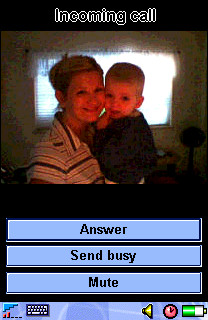
Let's begin with brass tacks: talk. The P800 works very well as a phone, offering handheld, speakerphone, and wired/wireless headset options for chatting. SE promises 400 hours of standby and 13 hours of continuous talk. My P800 has delivered about 50% of those totals, excluding other forms of use, like taking photos. Maybe I've got a bum Li-polymer battery pack, but I'll bet my numbers are close to average when graded on a curve. You can use MIDI song files as ringtones, but surprisingly the P800 cannot use an MP3 file as a ringtone even though it has built-in playback capabilities (more on that later). The P800 maintains a contact list that is separate from any you may have on your SIM card, although import/export capabilities allow you to perform a "dumb synchronization" (really, just an overwrite) from your P800 to your SIM. Speed Dial shortcuts are provided for 1-9 on the keypad, and photos you take with the camera can be associated with contacts and will display when those contacts call in. This is a slick feature and it adds a very personal touch to your day-to-day conversations.
The speakerphone feature is well designed. It automatically engages if the keypad is flipped open while you're on a call; the handset assumes you could looking for something on the P800's display and therefore not holding the device next to your head. The included earbuds work fine as a headset, although I still don't understand why SE sees fit to use a proprietary jack; otherwise I could use any standard 1/4" headset to listen to MP3s or take calls. Must be a voltage thing. A Bluetooth-compatible headset, easily paired with the P800 by following the on-screen prompts, is a better all-around choice for hands-free talk.
For SMS and email, having the power of a handwriting/QWERTY keyboard input system really makes convergence devices shine in comparison to traditional keypads and workarounds like T9 text input. The P800 is no exception here, and it makes composing and replying to SMS a quick and efficient affair. You may use the stylus to directly enter alphanumeric characters onscreen using gestures that are wisely designed to mimic Palm's Graffiti 2; the main difference is that the screen divides letters from numbers horizontally vs. the Palm's traditional vertical split. The interpreter built into the P800 is called JotPro, and its function is quite similar to the Palm input experience. The stylus, itself, however, is a narrow, flimsy, and easy-to-misplace affair that snaps to the side of the P800. You'll want to use almost anything else instead of this afterthought. A popup virtual keyboard is always available and its keys are acceptably sized for tapping with a stylus, though not fingers. All P800 applications use either input system, so there's no learning curve beyond basic gestures and displaying the popup keyboard. What's missing? A system for storing gesture shortcuts for frequently-used words and phrases (like Palm provides). But otherwise it's an effective mix.
With email, the P800 supports multiple inboxes. The default messaging client allows POP or IMAP access and synchronizing your inbox only requires a valid GPRS data connection plan and some patience during the setup process. Sony Ericsson's own website offers to auto-configure your P800 with the right settings with OTA (over-the-air) instructions using an "MMS Configurator" utility, but this only seems to work for T-Mobile in the USA. Otherwise you'll spend a fair amount of time hunting down and entering GPRS connection info (much like configuring TCP/IP networking on a desktop PC) if your handset doesn't ship with the right presets. Once you're past this hassle, though, sending and receiving email on the P800 is a practical activity. True to my late-adopter traditions, I haven't used any of the available reader applications to view Microsoft Office attachments or PDF documents, but supposedly some good packages are available.
The P800 shines as a composition tool for MMS, because it's such a useful device for capturing original media, like audio and photos, wherever you are. The MMS editor allows you to assemble a slide show of text, images, or audio, which can be sent to other MMS-capable mobiles and email addresses alike. MMS remains a nascent messaging technology in the US, but putting more devices like the P800 into the marketplace can't hurt adoption rates.
Digital Camera
This is the first camera-equipped phone I've put to everyday use. It shoots 640x480 images with 24-bit color depth, which is more than acceptable for simply capturing whatever you witness as you go about your day. Unfortunately it can only display images with 12-bit (4096 colors) depth. It's by no means a digital camera replacement, but some wonks believe cameraphones will shoot print-ready photos and replace the most compact and "ordinary" digital cameras in a couple of years. I can certainly take some stock in this prediction after a few days shooting pics with the P800. It shoots landscapes and other still, well-lit images with highly agreeable clarity and color accuracy. It does modestly well with indoor and low-light situations, but it's really more than acceptable for "party" snaps and other informal, capture-the-moment images. To see just how well the P800 stacks up against its contemporaries in image capture quality, check out Steve's shootout. I also have a moblog I've been keeping since I got my P800 that holds a variety of pictures I've taken mainly while on the go.
Images are easy to select for messaging to others, either as MMS or ordinary email attachments. Nonetheless, I'd love to see someone develop a "bulk mailing" P800 application for moblogging, or possibly even auction item listing association. It's much too tedious to send a series of images as individual messages with attachments. With camera-enabled covergence devices, there's a real opportunity here for third party developers to create applications that enable previously impractical tasks involving imaging in the field. Break-fix repair technicians, claim adjusters, medical first-responders, and a host of anonymous enterprise applications are there for the building; it's up to developers and end users to recognize what mobile imaging devices like the P800 make possible and then find the most pressing problems to solve.
PDA Functions / General Applications
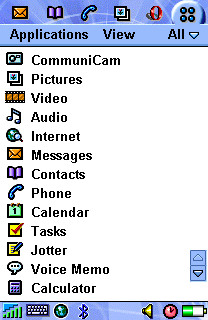 |
| The P800 ships with a typical array of PIM applications, but many more are available for download. |
If you're looking for deep wisdom and insight into the suitability of the P800 as a replacement for your current PDA, or as your first, sadly my experience may not help your with decisionmaking. I use the P800 first and foremost as a cameraphone and mobile messaging client; applications and contacts/calendar/tasks are a distant second priority for me, and my dirty little secret is that I'm not yet ready to let go of my Palm! The P800 does offer a surprisingly wide variety of third party applications to date because its Symbian OS supports applications written in both Java (J2ME) and C++. You can explore a sizeable library of titles at My-Symbian.com. Another option is AppForge. By installing their cross-platform Booster runtime environment, you may browse a live catalog of downloadable shareware titles. AppForge is similar to Verizon's GetItNow! pay-per-application program, powered by the Qualcomm Brew framework. It allows you to download applications wirelessly (rather than synchronize an installation through your PC) and pay for the ones you keep past a limited free trial period.
For media fun, the P800 is capable of playing back MPEG-4 video (but not recording it, unless you believe what you'll find here) and MP3 files kept in internal storage. I don't know that the video playback feature is terribly useful on today's North American networks, but it's nice to see the smart kids at Ericsson exercizing their head-of-the-class instincts with more mature 3G networks in mind (i.e., 3). To view streaming video on your P800, on-demand, would really be something; shoot, I'd even pay for access to some headline news and sports highlights. Again, I take issue with the proprietary headphone jack -- it's just a pointless specialization in an otherwise open standards-oriented package.
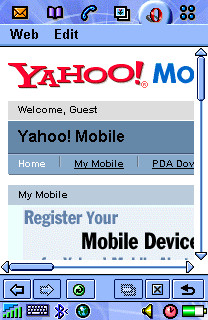
As a mobile browser, the default client is acceptable, but a much better replacement can be found in the free Opera download SE makes available directly from their P800 site. The 320x208 display area is of course too narrow to handle most desktop-oriented website content without excessive scrolling, but Opera's ability to compose a usable page is commendable -- even with framesets. Opera is able to browse either HTML or WML "wireless web" sites. One very useful Opera feature is called "Fit to page." It forces any site to scroll only vertically by compressing images and realigning all content within a single, display-width column. This feature can create an incredibly 'tall page, however, and it requires extra rendering time (over a minute to load CNN.com in this mode vs. about 50 seconds in the standard view). It would be nice if Opera could rotate the browser display 90° and display pages in a landscape layout; this way the P800's 308 pixel-wide aspect could be put to more effective use.
 |
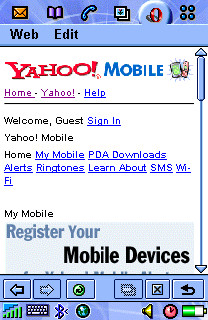 |
| Opera browser display without "Fit to page" feature applied. Lots of horizontal scrolling. | Opera with "Fit to page" applied. Unnecessary styles/graphics removed, others resized to fit 208 pixel display. |
Synchronizing or downloading data from the P800 proved to be a Jeckyll and Hyde affair. The P800 Phone Connection Link package auto-detected and transferred image files between the P800 and my Thinkpad effortlessly when using Infrared. With my external Belkin Bluetooth USB adapter, however, detection and pairing was completely hit-or-miss. Nearly every time I attempted to connect, the Bluetooth adapter would report a serial port conflict. When I would simply try again, the conflict would vanish without a trace. Sometimes. I'm willing to blame the aftermarket Bluetooth adapter for my troubles, up to a point, but I just shouldn't have to master IRQ settings and mind serial port conflicts in 2003. I thought these late-model synch technologies were supposed to make these headaches disappear? C'mon, driver developers. You know you can do better.
I think that the success of the P800 (and its Symbian-powered peers and successors) depends largely upon the continued adoption of Symbian as a general purpose pocket computing OS. As long as developers are incented to build applications for a growing user base, then the Symbian OS and the UIQ variants like the P800/900 should gain traction. I still need to see the new Treo 600 in action to decide whether I could give up the Palm PDA environment for good. At this stage, I carry the P800 and a Tungsten T2, so I guess the answer is currently, "nope."
Bottom line
The P800 is a brilliant camera/phone/MMS messaging device. At $539, which is AT&T's latest with-activation pricing, it's comparable to the cost of a higher-end PDA plus a basic cameraphone and service plan combined. If, like me, you're just getting your head around the idea of having one device from which to run your daily show and tell, the P800 merits real consideration unless you're a Palm or PocketPC loyalist. It's true that the just-announced P900 promises to advance nearly all of the P800s capabilities while slimming down the form factor, so if you're patient or still on the fence, you might sit tight.
Ratings
phone: 8
texting: 9
mms: 9
email: 9
browser: 5 (Opera: 8)
pda features: N/A
camera: 10
battery: 6
usability: 8
durability: 7
stability: 9
gameplay potential: 7
third party apps: 8
fashion: 6
out-of-box accessories: 7