
(Author note: This review of the Sony Ericsson P800 is written for late adopters — anyone too sheepish to admit they weren't right there when this curious, sophisticated device came to market last autumn. Sony Ericsson (hereafter "SE") announced its successor, the P900, just last week at CTIA 2003, so P800s should be become cheaper by the dozen quite soon in both closeout retail and secondary markets, as well as directly from AT&T. The author is a noted late adopter, having most recently jumped the Chicago Cubs bandwagon around Game 2 of the Division Series against Atlanta. He's since returned to his seat in the Cleveland Indians apple cart.)
The days of mobile phones being referred to strictly as, well, phones, are numbered. Convergence is the irresistable trend in the mobile marketplace, and in the US, carriers are falling over themselves to market devices that perform innumerable business, personal and lifestyle tasks. The most common hybrid handset is the camera phone -- every major national carrier has at least one in their lineup and they all allow on-the-go capture and transmission of images to other handsets or email addresses. More ambitious mobiles incorporate full-fledged PDA features, including the holy troika of calendar/contact/task list management as well as the ability to run Palm or Symbian OS applications of many shapes and sizes. As a mobile consumer it usually comes down to a tradeoff between chic, streamlined simplicity and bulkier, kitchen-sink capability in both physical form and embedded function. (That said, could someone please tell T-Mobile or AT&T that it won't kill them to market the portability of the SIM account card to better spur handset sales and upgrades? Yes, America, you can own more than one phone on these networks. It's true!)
Enter the Sony Ericsson P800. Since it shipped in late fall 2002, it has held sway as the convergence device of choice among GSM wireless geeks and other early adopters, but by no means has it become a mainstream appliance in US markets. The primary constraint has been the simple lack of a P800 rollout in any carrier marketing campaigns, while other all-in-ones received broad exposure, like the old Handspring Treo (Sprint) or the Samsung SPH-i700 (Verizon). Only recently has AT&T made a case for the P800. This is unfortunate, as the P800 is a device of considerable technical merit in a suprisingly compact form factor that offers everyday usability. It's also just plain fun to have one in your holster.
Form Factor
 |
The P800 is a trim technology sandwich, considering its ingredients:
(See complete P800 specs from SE)
Weighing in at 5.6 ounces and sporting 4.6" L x 2.3" W x 1.1" D dimensions, it feels roughly like a carrying pack of oversized playing cards in your pocket. When I first acquired the P800 I figured it would be pretty uncomfortable to use as an everyday phone, but it didn't require much usage to change my mind. Compared to the original Handspring Treo 180, which is uncomfortably wide for the average pants pocket, the P800 feels much more like an ordinary phone such as the once ubiquitous and redoubtable Nokia 6160, an analog/TDMA handset that solidified Nokia's US reputation during the late 1990s. It's worth noting that the 6160 weighed .3 oz. more than (and is exactly as thick as) the P800!
The P800 I've used has the flip-top keypad shown above; you can opt to remove the flip and live with a virtual keypad on-screen only (which would mostly drive me nuts). The pad's keys physically tap on the touchscreen below, which is a clever design but the mechanics make the phone thicker than it might be otherwise. When you receive a call, the P800 expects you to press the OK keypad button to answer -- no exceptions. Old timers like myself who expect a phone to auto-answer when you flip it open will ignorantly bray "Hello? Hellooo?" into the mic while the ringer continues to chime away. If there's a preference for this, I didn't see it in the P800's Control Panel application.
In short, you might think "this is kinda big" when you first get your hands on it, but you'll quickly get over it.
Phone/Text/MMS
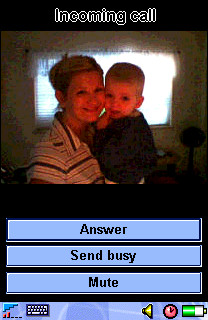 |
| Display images when address book entries call. |
Let's begin with brass tacks: talk. The P800 works very well as a phone, offering handheld, speakerphone, and wired/wireless headset options for chatting. SE promises 400 hours of standby and 13 hours of continuous talk. My P800 has delivered about 50% of those totals, excluding other forms of use, like taking photos. Maybe I've got a bum Li-polymer battery pack, but I'll bet my numbers are close to average when graded on a curve. You can use MIDI song files as ringtones, but surprisingly the P800 cannot use an MP3 file as a ringtone even though it has built-in playback capabilities (more on that later). The P800 maintains a contact list that is separate from any you may have on your SIM card, although import/export capabilities allow you to perform a "dumb synchronization" (really, just an overwrite) from your P800 to your SIM. Speed Dial shortcuts are provided for 1-9 on the keypad, and photos you take with the camera can be associated with contacts and will display when those contacts call in. This is a slick feature and it adds a very personal touch to your day-to-day conversations.
The speakerphone feature is well designed. It automatically engages if the keypad is flipped open while you're on a call; the handset assumes you could looking for something on the P800's display and therefore not holding the device next to your head. The included earbuds work fine as a headset, although I still don't understand why SE sees fit to use a proprietary jack; otherwise I could use any standard 1/4" headset to listen to MP3s or take calls. Must be a voltage thing. A Bluetooth-compatible headset, easily paired with the P800 by following the on-screen prompts, is a better all-around choice for hands-free talk.
For SMS and email, having the power of a handwriting/QWERTY keyboard input system really makes convergence devices shine in comparison to traditional keypads and workarounds like T9 text input. The P800 is no exception here, and it makes composing and replying to SMS a quick and efficient affair. You may use the stylus to directly enter alphanumeric characters onscreen using gestures that are wisely designed to mimic Palm's Graffiti 2; the main difference is that the screen divides letters from numbers horizontally vs. the Palm's traditional vertical split. The interpreter built into the P800 is called JotPro, and its function is quite similar to the Palm input experience. The stylus, itself, however, is a narrow, flimsy, and easy-to-misplace affair that snaps to the side of the P800. You'll want to use almost anything else instead of this afterthought. A popup virtual keyboard is always available and its keys are acceptably sized for tapping with a stylus, though not fingers. All P800 applications use either input system, so there's no learning curve beyond basic gestures and displaying the popup keyboard. What's missing? A system for storing gesture shortcuts for frequently-used words and phrases (like Palm provides). But otherwise it's an effective mix.
With email, the P800 supports multiple inboxes. The default messaging client allows POP or IMAP access and synchronizing your inbox only requires a valid GPRS data connection plan and some patience during the setup process. Sony Ericsson's own website offers to auto-configure your P800 with the right settings with OTA (over-the-air) instructions using an "MMS Configurator" utility, but this only seems to work for T-Mobile in the USA. Otherwise you'll spend a fair amount of time hunting down and entering GPRS connection info (much like configuring TCP/IP networking on a desktop PC) if your handset doesn't ship with the right presets. Once you're past this hassle, though, sending and receiving email on the P800 is a practical activity. True to my late-adopter traditions, I haven't used any of the available reader applications to view Microsoft Office attachments or PDF documents, but supposedly some good packages are available.
The P800 shines as a composition tool for MMS, because it's such a useful device for capturing original media, like audio and photos, wherever you are. The MMS editor allows you to assemble a slide show of text, images, or audio, which can be sent to other MMS-capable mobiles and email addresses alike. MMS remains a nascent messaging technology in the US, but putting more devices like the P800 into the marketplace can't hurt adoption rates.
Digital Camera
This is the first camera-equipped phone I've put to everyday use. It shoots 640x480 images with 24-bit color depth, which is more than acceptable for simply capturing whatever you witness as you go about your day. Unfortunately it can only display images with 12-bit (4096 colors) depth. It's by no means a digital camera replacement, but some wonks believe cameraphones will shoot print-ready photos and replace the most compact and "ordinary" digital cameras in a couple of years. I can certainly take some stock in this prediction after a few days shooting pics with the P800. It shoots landscapes and other still, well-lit images with highly agreeable clarity and color accuracy. It does modestly well with indoor and low-light situations, but it's really more than acceptable for "party" snaps and other informal, capture-the-moment images. To see just how well the P800 stacks up against its contemporaries in image capture quality, check out Steve's shootout. I also have a moblog I've been keeping since I got my P800 that holds a variety of pictures I've taken mainly while on the go.
Images are easy to select for messaging to others, either as MMS or ordinary email attachments. Nonetheless, I'd love to see someone develop a "bulk mailing" P800 application for moblogging, or possibly even auction item listing association. It's much too tedious to send a series of images as individual messages with attachments. With camera-enabled covergence devices, there's a real opportunity here for third party developers to create applications that enable previously impractical tasks involving imaging in the field. Break-fix repair technicians, claim adjusters, medical first-responders, and a host of anonymous enterprise applications are there for the building; it's up to developers and end users to recognize what mobile imaging devices like the P800 make possible and then find the most pressing problems to solve.
PDA Functions / General Applications
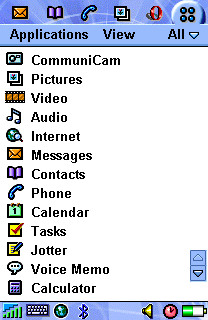 |
| The P800 ships with a typical array of PIM applications, but many more are available for download. |
If you're looking for deep wisdom and insight into the suitability of the P800 as a replacement for your current PDA, or as your first, sadly my experience may not help your with decisionmaking. I use the P800 first and foremost as a cameraphone and mobile messaging client; applications and contacts/calendar/tasks are a distant second priority for me, and my dirty little secret is that I'm not yet ready to let go of my Palm! The P800 does offer a surprisingly wide variety of third party applications to date because its Symbian OS supports applications written in both Java (J2ME) and C++. You can explore a sizeable library of titles at My-Symbian.com. Another option is AppForge. By installing their cross-platform Booster runtime environment, you may browse a live catalog of downloadable shareware titles. AppForge is similar to Verizon's GetItNow! pay-per-application program, powered by the Qualcomm Brew framework. It allows you to download applications wirelessly (rather than synchronize an installation through your PC) and pay for the ones you keep past a limited free trial period.
For media fun, the P800 is capable of playing back MPEG-4 video (but not recording it, unless you believe what you'll find here) and MP3 files kept in internal storage. I don't know that the video playback feature is terribly useful on today's North American networks, but it's nice to see the smart kids at Ericsson exercizing their head-of-the-class instincts with more mature 3G networks in mind (i.e., 3). To view streaming video on your P800, on-demand, would really be something; shoot, I'd even pay for access to some headline news and sports highlights. Again, I take issue with the proprietary headphone jack -- it's just a pointless specialization in an otherwise open standards-oriented package.
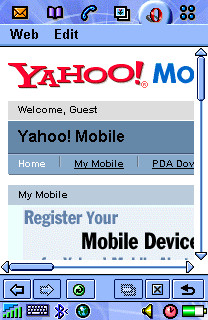
As a mobile browser, the default client is acceptable, but a much better replacement can be found in the free Opera download SE makes available directly from their P800 site. The 320x208 display area is of course too narrow to handle most desktop-oriented website content without excessive scrolling, but Opera's ability to compose a usable page is commendable -- even with framesets. Opera is able to browse either HTML or WML "wireless web" sites. One very useful Opera feature is called "Fit to page." It forces any site to scroll only vertically by compressing images and realigning all content within a single, display-width column. This feature can create an incredibly 'tall page, however, and it requires extra rendering time (over a minute to load CNN.com in this mode vs. about 50 seconds in the standard view). It would be nice if Opera could rotate the browser display 90° and display pages in a landscape layout; this way the P800's 308 pixel-wide aspect could be put to more effective use.
 |
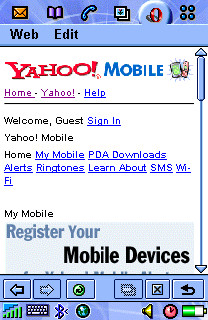 |
| Opera browser display without "Fit to page" feature applied. Lots of horizontal scrolling. | Opera with "Fit to page" applied. Unnecessary styles/graphics removed, others resized to fit 208 pixel display. |
Synchronizing or downloading data from the P800 proved to be a Jeckyll and Hyde affair. The P800 Phone Connection Link package auto-detected and transferred image files between the P800 and my Thinkpad effortlessly when using Infrared. With my external Belkin Bluetooth USB adapter, however, detection and pairing was completely hit-or-miss. Nearly every time I attempted to connect, the Bluetooth adapter would report a serial port conflict. When I would simply try again, the conflict would vanish without a trace. Sometimes. I'm willing to blame the aftermarket Bluetooth adapter for my troubles, up to a point, but I just shouldn't have to master IRQ settings and mind serial port conflicts in 2003. I thought these late-model synch technologies were supposed to make these headaches disappear? C'mon, driver developers. You know you can do better.
I think that the success of the P800 (and its Symbian-powered peers and successors) depends largely upon the continued adoption of Symbian as a general purpose pocket computing OS. As long as developers are incented to build applications for a growing user base, then the Symbian OS and the UIQ variants like the P800/900 should gain traction. I still need to see the new Treo 600 in action to decide whether I could give up the Palm PDA environment for good. At this stage, I carry the P800 and a Tungsten T2, so I guess the answer is currently, "nope."
Bottom line
The P800 is a brilliant camera/phone/MMS messaging device. At $539, which is AT&T's latest with-activation pricing, it's comparable to the cost of a higher-end PDA plus a basic cameraphone and service plan combined. If, like me, you're just getting your head around the idea of having one device from which to run your daily show and tell, the P800 merits real consideration unless you're a Palm or PocketPC loyalist. It's true that the just-announced P900 promises to advance nearly all of the P800s capabilities while slimming down the form factor, so if you're patient or still on the fence, you might sit tight.
Ratings
phone: 8
texting: 9
mms: 9
email: 9
browser: 5 (Opera: 8)
pda features: N/A
camera: 10
battery: 6
usability: 8
durability: 7
stability: 9
gameplay potential: 7
third party apps: 8
fashion: 6
out-of-box accessories: 7

Hi,
me too am carrying a P800 and a T2. looking for driver to pair both unit. Can't live without my palmOS PDA. Previously pariring T2 with T39m. Do you have any idea for that? TIA.
mhi
Posted by: mhi at December 24, 2003 09:18 AM
Hi!
My name is Marc and I am not able to send a SMS message with my P800. The problem is that my Palm Tungsten T3 doesn't find the cell by an IR conection. I think that I need the driver, but is incredible that the T800 software doesn't have it. Can somebody send me a message to help me?
Thanks for all!
Marc.
Posted by: Marc at January 18, 2004 04:54 PM
so this is interesting and i keep seeing repeated searches for this - but to get this straight, you are trying to send sms from your palm out through the GSM connection on your p800 via bluetooth? as opposed to just sending the sms from your p800?
Posted by: steve at January 26, 2004 09:15 PM
One owesome phone!
Take my words and empty your pockets.
You would not regret!
Posted by: freak at April 24, 2004 04:54 AM
Good Day people!
Will you help me with my p800 phone, as i received sms there is always a copy of the message so i always recived to sms... how to avoid these
Posted by: Patrick Manabat at May 17, 2004 09:05 PM
it s a good phone but i can t find application for free
Posted by: toufic at June 12, 2004 09:01 AM