August 26, 2004
AT&T EDGE service is, well, pretty damn fast
i just got back from a business trip - in which i had to use multiple internet connections in various places. i'm finding that hotel internet connections are getting more and more flaky, and this case the hotel conenction was down most of the night, so i fell back to my AT&T Wireless EDGE connection via bluetooth Nokia 6620 - wow - this was fast enough to actually use. as where plain GPRS was fast enough for email and some basic browsing, EDGE was fast enough to do all that, normal browsing, and even downloading from iTunes. i must say, i was impressed.
now if only nokia could get their asses in gear and put EDGE on a 7610, instead of the behemoth 6600, we could all be happy. EDGE on the 6230 is a nice option as well, but series 60 is growing on me.
August 21, 2004
at&t wireless has an unlimited data plan

i had to go get a nokia 6620 for a project we're working on - and was very happy to find out that at&t wireless now has an all you can eat data plan for $24.99! for EDGE even! ...this is $5 cheaper than t-mobile's unlimited GPRS plan, which makes me think i might switch my main line over to AWS, assuming it's not too cumbersome. of course AWS becomes cingular soon. i just signed a new 1 year contract on this line...but i wonder if this pricing will stay around through the merger.
August 20, 2004
my favorite photo tools


i must admit, when the rest of my partners got turned on to flickr, i didn't quite get the attraction...but the more i've used the service, especially in concert with our flickr splicer, the more it's grown on me.
now, flickr has launched the flickr organizr and now it's even cooler. this is how i want to organize my photos on a website. yeah, it's flash, but that's grown on me too.
this, in concert with cognima snap on my phone is how i'd like my photos to get stored and viewed. the nice people at cognima have been letting me demo their system, and it's really awesome on the nokia 7610...when you take a picture, you get prompted "save to album?" and if you say yes, it just gets replicated to your online album some time in the next few minutes. from your online album, you can choose which photos to make public. this is great, because i know everything on my phone is also on my album. this is the way it should work.
nokia's nokia album is a decent way to organize photos on the phone itself but that isn't really where i want my pictures. i really want an easy way to get them off the phone wirelessly. and once i get them off the phone, i need to be able to find them.
so these are my favorite photo tools as of today. tomorrow, i reserve the right to like something different.
now moblogging is something different...we'll get to that one later.
August 17, 2004
RIM Blackberry Mobile Feed Reader - seeking beta testers

Hello there - we are nearing the release of the FeedBurner Mobile Feed Reader Version 2, which we provide as a service to help publishers get their RSS/Atom content out via mobile channels - and in addition to the Symbian/Java/Palm OS platforms we deployed Version 1 upon, we will be adding a couple new platforms: BREW and RIM Blackberry.
We're soliciting help testing our Blackberry versions since the implementations vary greatly from network operator to network operator, and inside and outside the enterprise. If you provide helpful feedback we'll provide you with a free license for the application when the general release is available.
The FeedBurner service plays an important part in making this app work on the Blackberry:
First, FeedBurner SmartFeed™ technology allows us to easily normalize any of the nine flavors of RSS and Atom into a common format so that the mobile client can stay thin and fast; dealing with all those versions on the client is much too cumbersome.
Second, many of the Blackberry and WAP gateways installed at carriers and enterprises don't allow the content types we normally see associated with RSS and Atom files to be passed to the device, which would normally cause feeds generated from many common publishing tools to be incompatible with the Blackberry service. Again, SmartFeed technology comes to the rescue and automatically makes RSS and Atom files compatible with the carrier gateways.
 If you have a Blackberry that you purchased directly from T-Mobile, Cingular, AT&T Wireless, Rogers Canada, or another GSM provider, and feel like testing the mobile feed reader, enter the following URL in your browser (if your IT department gave you a BlackBerry, keep reading to the bottom):
http://www.feedburner.com/fb/products/rim/FeedBurnerMFR2.jad
and select "install" from the menu. The BlackBerry should then download the MFR, and notify you upon success. The FeedBurner icon should appear in your ribbon in the first postion. If you wish to move it, hold down the [alt] key and push in the scroll wheel, and select "Move Icon." Betcha didn't know that was there.
 Now for the important part - setting your network preferences. Because of security features built into the BlackBerry OS as well as the BlackBerry Enterprise Server, you must enter your WAP gateway preferences.
To do this, push in the scroll wheel, and select "Network". You should see the network settings screen. If you see your carrier, select it. If you are in the UK or Australia, and want to try your GSM carrier, select "Other" and enter the Access Point, WAP Gateway IP, and WAP Gateway port you would normally use with a GSM phone on your carrier's network.
If you are using a BlackBerry 6750/7750 you puchased directly from Verizon Wireless you need to have a 3rd party WAP gateway service such as MobileWeb4U and install the .alx and .cod files via your BlackBerry Desktop "Application Loader" application.
If you are using a Nextel 6510/7510 and wish to try the MFR, select "BlackBerry Enterprise" - there will be a Nextel option in a future version. The same goes for 7510 on Telus in Canada - select "BlackBerry Enterprise".
Finally, if your IT department gave you a BlackBerry (specifically if your company operates its own BlackBerry Enterprise Server with Mobile Data Service (MDS) ), you can still likely use this application, just choose "BlackBerry Enterprise."
There are a few known issues with the app, and the user interface will go through a BlackBerry overhaul -- but all feedback is welcome.
We're going through this beta cycle to catch all the different network configurations that are possible and make the service as seamless as possible - so if something works or doesn't work please email wirelesssupport AT feedburner DOT com and let us know.
August 13, 2004
iSync 1.5 still doesn't support nokia 7610
rumors were it was supposed to. bummer. sometimes being an early adpoter sucks.
can anyone find the preverify source for MIDP 2.0?
the lack of MIDP 2.0 on OS X is getting a little stupid. if someone can find the preverify source for 2.0 - please send it my way. i've done some looking but am looking to the community... yes, i'm well aware of the MIDP 1.0 implementations and where that source is.
August 10, 2004
dual CDMA / GSM phones
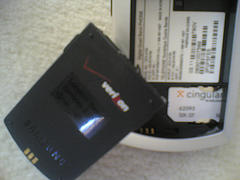
if you read this weblog by feed, you've already seen some pictures of this - but i've been using a samsung A790 given to us by qualcomm/verizon to test an application, and it's a quad band phone which includes both CDMA and GSM bands. this is marketed to verizon's "business customers" - i'm not sure why they don't offer it to the general public.
i know this picture shows a cingular SIM card in the phone, and to clarify, that SIM does not work - it was just what i had on hand when i took the picture. when you switch to GSM mode with this card in it, you get a "please insert a Verizon SIM card" message and it prompts you to go back to CDMA mode. flipping between CDMA and GSM is a manual process, and is meant for when you get off the plane in europe or asia.
incidentally, when i put in a vodafone españa SIM card, it did seem to accept it, which makes sense given the owenership structure of those companies.
my only other comment is this phone has about the worst keypad i've ever used on a phone. way worse than nokia's wackiest design.
digging around a little, i see there are more of these dual CDMA/GSM phones coming out, especially in China, where they already use SIM for CDMA.
see this link on the motorola A840 over at mobileburn.com
August 05, 2004
initial thoughts on the Motorola V710
 this isn't a full review, but just some initial thougts on the Motorola V710. These phones have been highly anticpated as the first bluetooth capable phones available from verizon, and have been leaking out to a radio shack near you.
we needed one to test a BREW application we are launching soon, and i was lucky enough to find one at my radio shack down the street. these phones are pretty much coming in and out the door, as any friendly radio shack salesman will tell you, that is, after for some reason needing to collect your address for purchasing a $2 phono plug adaptor.
so, is this the latest and greatest? or just another crappy phone from motorola?
i guess it depends on your perspective. to the belt-clip-wearing-clamshell-toting masses, this will be seen as a great phone. it will become the new standard road warrior phone for those who love verizon clamshells, replacing the LG 6000.
to me, this phone is no big deal. yes it has a 1.2 megapixel camera which can shoot up to 1280x960 (see how that math works) and can also shoot video and play MP3s on an external memory card (not supplied) but aside from the camera, most middle of the road nokia and sony ericssons also have this stuff and more. motorola's UI has always been a bit lacking to me, and i don't think they improved it on the V710.
Don't get me wrong, there's a lot to like here. The screen is really nice and big enough to do some serious viewing/browsing - but because VzW doesn't provision WAP 2 by default with their data plans, i haven't been able to check this out yet.
The bluetooth seems to work well with headsets and bluetooth car kits but i haven't tried to use the phone as a bluetooth modem yet - this would be really cool if i could use the verizon network with my mac on the train. currently i use GPRS from either TMO/AWS and although it works okay, it could be faster.
more tests to come, again these are just some initial thoughts. i was hoping to be amazed at the new motorola - but i think this phone is just okay. not the soviet technology in this decade we're used to seeing from motorola, but still not up to par with nokia and sony ericsson's latest and greatest.
but hey, if you love verizon, and you want to upgrade, get one if you can!
August 04, 2004
mobile asses has a business model
warning: explicit links below click at your own risk, not necessarily office friendly
an unnamed colleague pointed me at this site, and whether you like or dislike the content, it's about the best example you are going to find in the public domain of a "Vertical Moblog" - totally dedicated toward one purpose, and able to charge premiums to users for premium services.
i only bring this up, because porn and gambling are leading indicators for business models of a technology at large. if your business model works there, it will work other places. AOL won't tell you this, but AOL makes a ton of money off people who have an account for no other reason than their illicit chat room. Operators won't tell you this, but a "really healthy percentage" of traffic going over their gateways is illicit content (i've seen it)
so although you see things like Vodafone blocks access to porn i know for a fact that other operators won't be so quick to move unless they get threatened with lawsuits. in fact, voda is really figuring out how to allow this content in a way it can make more money off it legally. they aren't ignoring the illicit markets.
that's all an aside...the good news is that a good vertical moblog can find a business model.
August 02, 2004
latest Motorola V710 User Manual
sorry for the crosspost, but i've gotten more inquiries about the Motorola V710 from those that don't have a bluetooth enabled car, so here's what i know:
This is a BREW enabled Motorola phone that will launch on Verizon and U.S. Cellular - and is one of the first CDMA bluetooth phones. I has a 1.2 Megapixel camera, and should be out soon. It was supposed to be out a while ago, but it looks like motorola has been tweaking the radio, as they've resubmitted their FCC approval tests at the end of June.