May 25, 2005
6680 syncs! via Bluetooth!

holy sync batman, the version of Nokia Sync that comes with the 6680 actually works!
I've owned pretty much every generation of Nokia phone since they've been makin' 'em, and PC Sync has never once worked as advertised. It always seems to have some device driver trouble, or partially sync items, or bluescreen my computer, or something.
I tried using the 6630 version (which had troubles) with the 6680, and it had even more troubles, so i decided to actually install the version that came with the phone, and it worked.
AND, it synced via Bluetooth with no problems. Now I can actually have all my tasks and calendar and everything on my Nokia phone.
woo hoo!
first problem with using 6680 native email
first of all, yes, i know i was speaking bad french in the title of my previous post. it was intentional.
second, i have run into my fist problems using the Nokia 6680 mail client. it mostly has to do with how i use email.
see, i never delete email. i'm one of those people that has my different clients delete them from the server every X days, but i mostly keep copies on the client. and i don't like IMAP, so i use POP. IMAP is way to slow and chatty, especially for a mobile device.
as of right now i have about 400 messages on the server, and this seems to be giving nokia trouble on the client. i am now to the point where on every retrieval, it is telling me i am out of memory and need to free soem up. it doesn't specify whether this is RAM or ROM, so i really have no idea. i also can't find whether or not it is stoting my mail on the device or the memory card...
May 24, 2005
trying to do email on 6680 aux naturale
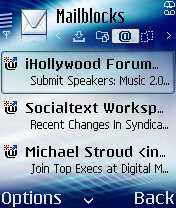
mostly because it's licensed by IMEI, and i don't want to plop down another $30 for Profimail, which is a fantastic app, and partly because i just what to see if our fine finnish friends at Nokia improved upon in this latest rev of the Series 60 , i am trying to get by using the on-board email application on the Nokia 6680.
so far, it seems to work pretty well, but i have had one lock up while downloading my message box for the very first time. otherwise, it hasn't been so bad. i like the integration with the phone's alerting system, and it can download on a schedule in the background.
the one thing it does that Profimail does not, is download partial messages. i like this option compared to soley headers or full messages.
i do miss the HTML rendering however. i'll see how long i can hold off.
May 22, 2005
the nokia 6680 home screen

Another rev of Symbian Series 60, another home screen. I like what Nokia did here, but it's not unlike what Windows Mobile has had for like, the last two versions.
At any rate, the 6680 sure has a vibrant screen but otherwise doesn't feel that different than the 6630.
I'll report more in a few days...
February 08, 2005
review: LG-VX8000
 i received an LX-VX8000 last night, one of verizon's new V Cast capable EV-DO phones - and although my first impressions were not very good, there are some pretty redeeming qualities here...
and let me start with that. the EV-DO speed is totally rockin'. DSL reports 80kbs but it is WAY faster than that, and i think that DSL reports tests are not accurate for mobile phones based on the tests i have performed. i'm sure this tech is optimied more than the 100-300K downloads that DSL reports uses. If you are looking for an phone to use as a high speed modem, this is certainly the best i have tried.
now for the bad news. you have to use the EV-DO via a cable. no bluetooth on this baby. for that you'll have to wait for the VX8100, and considering i saw the VX8000 at CTIA almost a year ago, who knows how long you will have to wait for that. at least with my Moto V710 people thought "how the hell is that guy getting to the internet" on the train - now they think "look at that dork with the cable going into his bag." Note: the cable is not included in the package, it's an aftermarket accessory
if you are getting one of these phones, let me save you the trouble on how to use the VX8000 as a modem:
1. create a DUN connection in windows
2. the phone number is #777
3. your username is [insert 10 digit phone number]@vzw3g.com for example if your phone number is 1234567890, you would put "1234567890@vzw3g.com" in the username field, without the quotes.
4. your password is "vzw" just like that, all lower case, with no quotes
at any rate, i'm looking at the google maps demo right now with no significant lag.
it's good to be a LPB again.
okay, so where do i start:
the looks
let's face it, this phone is fugly. you won't be impressing the ladies with this phone, although ladies, you might impress some men if you get one. what type of men, only time will tell. the VX8000 could be strapped on the terminator and feel right at home. this is a hunk of metal and every view, open or closed doesn't let you forget it.
the external screen however, is very cool - as it displays way more status than your average duplicate screen.
also external are a play, forward, and reverse buttons. since there is no external media, i'm not sure what they are for. once i figure that out i will post more.
the camera
the camera on the VX8000 is great. it's 1.3 megapixel (1280 x 960 )and you can see some examples of pictures taken with this camera here:
http://www.flickr.com/photos/steveobd/tags/vx8000/
it comes with a few other settings i havent' seen before such as "ISO Setting" and the "flash" is a bright light that only comes on and off when the picture is taken.
i think this camera is on par with the Sony Ericsson S700/S710, and the video is on par with the Nokia 6630.
once you've taken a picture you email or MMS it to your favorite friend or moblog as you would come to expect.
the games
on the LG-VX6000, i thought most of the BREW games kind of sucked. on the VX8000, not so much. VzW has done a good job of getting developers to develop some new games to the BREW 3D game APIs, including a port of Asphault Urban GT that certainly beats the pants of the J2ME port of the same name. You'll also find some re-worked favorites such as Jamdat Bowling 3D among others.
These games are all downloadable via the Get It Now BREW vending machine on the phone, with unlimited prices around $9.99 and monthly subsriptions somewhat cheaper.
outside of the N-Gage, which is built especially for gaming, this handset has some of the best games i've seen. a big step up from the LG-VX6000 days.
Applications
oh, boy, when you pick News and Info from the Get It Now menu, you no longer get brought to the BREW category for these applications, but rather an Openwave xHTML browser, and in my case, i got prompted for $4.99/month to access any content via the browser. how entirely lame is that?
More disturbing is the VzW making the decision that access to this information is better served via WAP than specialized applications. i think this might be a bit shortsighted in thinking these media are mutually exclusive.
as far as i can tell, the usual BREW email applications haven't made this way onto this handset yet, so for now, there's no way to use the VX8000 to get email via an application. there's probably a WAP application in there somewhere, but i don't see that as a feasible model for email on a phone, even at these speeds.
as of my writing this i am having some provisioning problems getting to the WAP/xHTML deck. it was working, but after i signed up for V CAST, which includes WAP access, i am now in an infinite "you must subscribe and pay $4.99 loop" from the openwave browser, which no matter how many times i accept it, i keep having to re-enroll. not fun.
V CAST
one of the bigger selling points of the VX8000 is the availability of Verizon's V CAST service, which is their true 3G service offering that allows downloading of high quality video clips and other rich media.
as previously stated, the download speeds on this phone are pretty adequate to support this type of activity, and in general i've been pretty impressed.
i'm not really a "tv on your phone" zealot, but i can easily see entertaining my kids ar restaurants with the Sesame Street clips, or getting the weather or sports replays on demand via this medium. the video clips do stream, which pleasantly surprised me, however, a few times i did see them stop to buffer.
the service is $15 per month, which doesn't seem outrageous, but $9.99 would be a lot more palatable, i think.
the Get Tunes and Tones section is a little devoid of content providers at this point, and music downloading on demand would be a good service to add here, espeically with the phones music play controls on the outside.
provisioning V CAST took a phone call as the VzW website game me errors (or only worked with IE, which i wasn't using) - so i had to call. this was the "first one of these" that the agent had performed.
in summary
a good phone with a lot of potential, but lack of bluetooth makes me think you'll want to upgrade to the LG-VX8100 when that comes out. that's okay, you'll be able to EBay this handset, no problem. i've had a few issue provisioning the phone as a replacement for an existing Verizon account. at this price, you should get a data cable included in the package.
ratings
phone: 9
texting: 7
mms: 7
email: 0
browser: 7
pda features: 5
camera: 10
battery: 6
usability: 7
durability: 5
stability: 8
gameplay potential: 9
third party apps: 8
fashion: 4
out-of-box accessories: 4
legend:
0 = nonexistent
3 = below average
5 = average
7= above average
10 = the best i've seen
January 20, 2005
Nokia 6630 second impressions
A few weeks ago i posted my first impressions of the new Nokia 6630 and now that i've had a few weeks to use the phone my impressions have changed a little.
I have to say, the 6630 is sticking with me as a main sidearm - which is pretty much a continual game of king of the mountain.
First, the lack of memory is less of an issue than i had previously feared. My usage patterns have changed a little to running fewer applications concurrently, but for some reason i really am no longer getting out of memory dialogs as often. Perhaps this is just learned behavior before taking pictures.
Second, they have fixed enough things in the OS itself that certainly makes this an easier phone to use than even the immediate predecessor, the 6620. The handling of the hot swappable memory card is done very well, and the more i use the phone, the more of these subtle differences i see.
I still have a few caveats with this handset however, which to be fair are some reasonable trade-offs.
The processor on the phone is markedly faster than other Series 60 devices - this makes a lot of other things faster such bandwidth downloading, xHTML rendering, and Java applications. The cost is a very short battery life. Between the processor itself and my simply using more network aware applications that use the EDGE connection in the background, I am often getting only 12 hours of battery life.
if i close all running applications before pocketing the device, the battery life is similar to other Series 60 devices, but i'd argue that they need to provide a stronger battery to reap all the benefits of the 6630.
The second caveat is the camera. Although better than the 7610 and able to shoot at a higher resolutions at 1.3 Megapixels, I don't think the quality of the pictures even gets anywhere close to the Sony Ericsson S700/S710. Pictures are just a little grainier and the colors are not as sharp.
Perhaps an updated cameraphone shootout is in order?
This is still a shortcoming, but it doesn't render the phone "useless" as i might have indicated before.
January 01, 2005
Nokia 6630 first impressions
I have to agree with Russ on this one - Nokia went to great lengths to fix some design issues that existed in the 7610 and 6620, but this phone is practically useless because of the lack of RAM!
Three or four times now, when trying to snap a picture i have gotten "Not enough memory, close some applications" errors and ended up missing the photo opp! and after holding down the application key to get the running list, the only thing i had running was Messaging, Phone, and Contact List. If you use the on-board Email app to retreive your email automatically, that's enough to max out the phone. How frustrating - this never happened on my 7610 or 6620. what were they thinking indeed.
The few good things about this phone are
- The speed. very fast, and processor speed has everything to do with EDGE speed as well, so the downloads are much faster using EDGE than the 6620
- Hot swappable memory, finally!
- The phone works without a SIM! How simple is this? but no one has done it before. there are definitely cases such as swapping contacts or transferring applications that a power user needs to run the phone without a SIM
- They finally added "Flight Mode" to non-N-Gage Series 60 phone, so you can do things like read e-books on the plane and not get hassled by flight attendants. This was on the original N-Gage 1 power button tap menu but wasn't on any other Series 60 phones.
- The camera - still not quite as good as the Sony Ericsson S700/S710 , but about there. The click to picture lag that exists in the 7610 is still there but smaller. pictures of moving objects (such as kids) are still difficult.
Also, there are some differences i have found between the versions Nokia is giving out to developers and the operator versions. I have a TIM (Italy) OEM version and they fixed a few Java VM issues that I encountered while trying a developer version given to one of our partners...whew! thought they messed that one up too.
Hope they fix this memory issue in the 6640!
December 29, 2004
coming soon...
i'm way behind on device reviews - coming soon Nokia 6630 (arrived today!), Audiovox SMT 5600, Moto E680, and Moto MPx220. I promise. any preferences on what comes first?
October 15, 2004
review: BlackBerry 7100t

I've been using the new RIM BlackBerry 7100t for almost a week now, and here are some initial thoughts on the device itself and the experience of having RIM-like email on a phone device.
The 7100t is really a true hybrid between the BlackBerries we are all used to seeing and semi-smartphones we are used to see from the likes of Nokia or Sony Ericsson.
Lenthwise and widthwise, it's candybar format is a little wider than most bar phones, but a little thinner than a traditional BlackBerry 72XX series phone. Depthwise, that's true as well. it's a little thinner than something like a Nokia 6620, and just a little bit thicker than your typical BlackBerry.

Functionality wise, it sits right in the middle as well. The 7100t is finally more usable as a phone from both a size and embarassment standpoint, but will provide nothing near what you might need application-wise in a traditional Nokia Series 60 phone. Even though you can add third party applications to the RIM devices, there just aren't as many available as with a typical series 60 device. it's right in the middle.
the email experience
But BlackBerry users typically are in it for the email experience. There are a ton of people that still carry both a phone and email device, and i although the 7100t will change that for some people, there will still be penty of us out there who will be double fisting.
there's nothing like getting your email as it arrives and not having to wait while it downloads in the background. there are plenty of email programs for smartphones that download in the background, but it's still not the same. nokia's email support sucks. sony ericsson's is a little better. motorola...i don't like to badmouth anyone. let's just say if they were playing little league, i'd give them the "most improved player" award.
but what has traditionally been great about BlackBerries are the ability to respond to email. how does the 7100t do?
right in the middle of a traditional BlackBerry keyboard and T9 or quivalent on other phones with a standard 9 key keypad.
you can see on the picture above the spectrum of the BlackBerry 7230 keyboard, the 7100t, and a Nokia 6620 with a 9 key keypad we've all been used to ever since AT&T rolled out touch tone dialing.
i have the followng observations:
- i'm nowhere as proficient a typist on the 7100t as on a traditional RIM keyboard
- i'm way more productive on the 7100t than on T9
the biggest difference with the 7100t is you have to pay attention to what you are typing else you will end up with words you did not intend to type. at certain places in your sentence you have to "branch off" one way or another with words.
for example, in typing a reply to my collegues today i mistakenly sent "i am going to pinkish a new entry" instead of "i am going to publish a new entry" because the "i" and the "u" share a key i somewhere made a mistake and that's the word it picked. T9 probably would have done the same thing, an original BlackBerry probably would have just left a misspelled word.
all in all, it's pretty good, and i would expect to get more proficient over time.
ze phone
The phone itself is middle of the road. The reception is about average and on par with any other blackberry phone. Clear, but not crystal clear. now a whole lot to say here.
the screen is pretty good looking - much more the dimensions of a phone than a typical RIM. it comes with an odd "Comic Sans" font as its default font, which took awhile to figure out how to change. the other defaul is "anti-aliasing off" which just looks really "jaggy" at this resolution. very odd. turn on "anti-aliasing" for sure.
bluetooth
oh, where do we start. the 7100t supports exactly 2 bluetooth services, "AUDIO Gateway" and "Voice Gateway". which pretty much means you can use a headset or handsfree with the 7100t, and that's about it as far as bluetooth.
for comparison, most nokias support 8 bluetooth profiles, and most sony ericssons support 12. what's missing?
- Dial Up networking (you can't use the 7100t as a bluetooth modem)
- Obex File Transfer (you can't push pictures to it, even though you can set wallpaper with photos)
- Obex Object Push (business card transfer)
- no service for syncing via bluetooth
- a bunch of other stuff you may or may not use
I find this a little odd since most of the products that T-Mobile distributes are pretty open so i'm not going to fly off the handle and declare it "crippled" just yet, but let's just say the usefulness is severly limited, and i'll be turning bluetooth off to save battery life - although i'd probably use it with my car if i didn't use another phone for voice.
the browser
one of the best things about 7100t is the browser. it does a pretty good job rending all types of markup (HTML, xHTML, and WML
) and even supports popups if you want it to. It seems to render pretty fast, and just is generally better than its predecessors.
the IM client
another great thing about this phone is the IM client. if you are an AOL instant messenger or Yahoo! messenger user, the bundled OZ IM client is great. it will pull in your buddy lists from those services respectively, and run in the background along with email. i've had a few cases where running both at the same time seemed to logjam getting email, but for the most part it has worked without incident. a great companion to plain SMS, which the 7100t also supports.
the rest
the rest of the phone's features are similar to the BlackBerry 7230 family i reviewed a year ago.
the thing that would stop me from using this as an everyday phone is the lack of a camera and to some extent missing bluetooth features. otherwise it's a great phone. I guess i'd rather see the price stay low on this phone than putting in a half-assed camera like the Treo 600, which is quite possibly the worst VGA camera on the market.
as RIM licenses their email capabilities to other vendor's platforms like Sony Ericsson and Nokia, i would certainly choose one of those smart-phones with RIM email capability, which would seem to cannibalize RIM's hardware market. but with so many more nokia and SE phones sold, and RIM addicts being somewhat brand loyal, it's probably a good bet for them.
RIM has included two USB cables this time around, one for the charger, and one for travel so you can charge the RIM with just your laptop and the USB cable. this is great.
BlackBerry email is still hands-down the best way to get AND respond to email on the go. The contact and calendar sync is good enough for me, but probably not good enough for dyed in the wool Palm OS addict.
ratings
phone: 5
texting: 9
mms: 0
email: 9
browser: 9
pda features: 7
camera: 0
battery: 6
usability: 7
durability: 8
stability: 7
gameplay potential: 3
third party apps: 3
fashion: 5
out-of-box accessories: 7
legend:
0 = nonexistent
3 = below average
5 = average
7= above average
10 = the best i've seen
October 05, 2004
Sony Ericsson S700i

In a phrase, the Sony Ericsson S700 is a camera with a phone, not a phone with a camera. I'm not going to do a full review because this phone is so similar to the K700i, but i will touch on the finer points of why you will want this phone, and the few reasons why you might not.
everything amout this phone revolves around the camera. it looks like a digital camera, and the buttons are placed as if it were a digital camera. the menu system is the exact same menu on my Sony DSC-T1, a standalone digital camera.
ah, but the secret is the phone scissors open into a phone with a keypad! In that case it acts and looks just like a K700, an awesome phone it it's own right. Great photos, good email, and great Java application support including the Multimedia API and the 3D graphics API. I would expect some great games to be written for this platform before it's all said and done.
The S700 has a memory stick duo (but NOT a memory stick duo pro) slot which allows up to 128 MB of video recording of unlimited length at 176 x 144 and shoots pictures at 1280 x 960 which look superb. the best i've seen.
if you don't feel like going there, here's one here:

the camera is a little grainy under low light conditions, but i could say the same thing about my DSC-T1, and almost any other digital camera for that matter.
one of the great things about this camera is a lens cover, which has a switch to easily open and close the cover. I've always wondered how the dust fleeing from my pocket to the lens on your typical cameraphone affected performance of taking photographs, but with a built in lens cover, i no longer have to worry. this is truly ingenious.
the phone itself is totally operable without opening up the keypad in most instances. you can take calls and place calls that are in your phonebook just by using the smartly placed keys, and i must say, this is most intelligently placed "back" button of any phone i've used. it's just in the right place and intuitive to use.
everything else about the S700 is pure sony ericsson. it's expandable via Java applications and great for ringtones and a small amount of mp3s.
my only complaint with this phone is the use of memory stick duo instead of memory stick duo pro, which would have allowed expansion up to 1 GIG, which would have truly made it a real digital camera with a phone attached, and even a decent mp3 player. the way it stands, 128 MB just isn't enough to run anything these days.
ratings
phone: 8
texting: 8
mms: 8
email: 7
browser: 8
pda features: 7
camera: 10
battery: 6
usability: 8
durability: 8
stability: 9
gameplay potential: 9
third party apps: 8
fashion: 10
out-of-box accessories: 9
June 19, 2004
review: nokia 6230
i carried around a nokia 7250 for quite a few months, and i always thought, "the only thing this is missing is bluetooth." as it turned out, the camera to the 7250 was soon proven to be weak, but that phone was otherwise eclipsed by the appearance of the sony ericsson T610.
now, the 6230 comes along and is pretty much the answer to what i was looking for - a compact profile phone with the power of a brick smartphone. it's all here: a great phone, with bluetooth, a decent browser, a normal keypad, EDGE and GPRS, and decent camera to boot. in addition the 6230 packs a video recorder, and an MP3/ AAC player to complement the FM radio we've come to expect in nokia series 40 phones. this is also the only phone this size i know of with an external storage card. in short, there is a lot to like.
the phone
the phone itself sounds great and seems to have a great antenna compared to other phones this size. also included is a speakerphone, called "loudspeaker" which works especially well for normal conversations where the phone is sitting on the table, and you are speaking to it from a normal distance. the speaker is quite loud, and distortion is minimal. you can also record your call, and access the phone's menu during a call, which is actually useful on models with speakerphone. overall, nothing out of the ordinary, but nothing missing. it even seems to get along fine with most bluetooth headsets or both the headset and handsfree profiles, and even is one of the few models to work well with bluetooth enabled cars.
the size of this phone is perfect. it fits in your pants pocket, it fits in your shirt pocket, and just about anywhere else you might want to fit a phone. below is a picture of the 6230. that's our girl, second from the left, along with her older cousin, the 7250, her fatter cousin, the 6600, and an older competitor, the sony ericsson T610.

the keypad takes some getting used to as it has a square joypad where it seems a joystick might do better. the directional support is okay, but pushing straight in and "selecting" is tough and takes some practice to get right.
the camera/camcorder
let's face it, the phone is nice, but a good reason to buy the 6230 is the camera and the camcorder, both which i think are above average, but not necessarily the best on the market. however, for this form factor, the 6230 is the best choice on the market, especially since it has external, albeit the obsolete MMC format.
Here's a sample movie from 6230, taken at night at a carnival (requires quicktime):

and another during the day.

yes, that's right, i am a carnie in my spare time.
how about the stills? pretty good. the pictures look great, even in full sunlight, which some cameraphones won't even do. 640x480 is the maximum size however. Click for full size images.

|

|
| Nokia 6230 | Toshiba VM4050 |
Really, mp3's on that phone?
yes, and AAC as well. they can be played either through the Nokia specific headset, via the loudspeaker, or via a bluetooth headset. mp3's are pretty easy to copy over to the MMC is you have a PCMCI adaptor, otherwise pretty slow via bluetooth.
AAC is a little more challenging, unless you keep AAC files laying around. even if you use iTunes - you don't get AAC natively anymore. you get .m4p files wrapped in a DRM envelope. then you have to use something like hymn to strip the DRM envelope into a .m4a file, which can then be converted by iTunes into an AAC. that's way too much work if you ask me. it's kind of a bummer since this is all fair use of the tunes you have purchased - it would be nice for apple and nokia to work on this together, but i guess that doesn't sell iPods.
messaging
SMS is pretty standard on the 6230, and a standard 3x3 keyboard helps.
MMS is a little better than some of the other series 40 phones. finally, SMIL slideshows are kind of rendered, but a slideshow still can't play automatically.
The 6230 UAProf says that it allows a 100K MMS, and a picture size of up to 352x288 - not quite as good as the nokia 6600, but acceptable.
Finally, the series 40 comes with an email client, that allows you to get email off of a POP3 server of your choosing. the app is a java MIDP 2.0 midlet that can only display text and the smaller of your messages. it's a bit difficult to setup, as both the send and receive require their own GPRS settings, but works well enough once you get through that exercise. this client still isn't as good as the one that ships out of the box on the sony ericsson T610, or even the T68, but it DOES allow for authenticated SMTP, which even the latest revs of series 60 do not support. in summary, the email capabilities are good enough to see if anything big is going on in the office, but not good enough to fire off a decent response. follow up requires using the phone.
games and MIDP2.0
the 6230 comes with a cool bluetooth enabled java games, Beach Rally II and a respectable Golf game that is a good time killer. the 6230 is MIDP2.0 capable so it supports the latest and greatest java downloads.
other MIDP2.0 apps seemed to run alright without modification, although platformRequest() doesn't work on this phone either.
other features
the 6230 also supports syncML and some other features that aren't supported by any carrier here, so i couldn't try them out. i've been using the phone as a modem with my powerbook G4 everyday on the train, and found it to be the most reliable in that area as well.
the net-net
in summary, this is proabably the best camera/videophone in this profile on the market. if you want to carry a bigger phone around, you can do better, but otherwise this is a great phone. it's the one i've been using exclusively for the last month or so, which tells me something. i think it's the functionality that has kept me coming back for more. it just works with everything so smoothly, i never need to change my SIM to another phone anymore.
May 12, 2004
review: apple and logitech MX900 bluetooth mice
of mice and man
my main machine is an original apple powerbook G4 that unfortunately doesn't have built in bluetooth. i am an avid bluetooth user though, using a D-Link USB bluetooth dongle to do such things as use my phone as a GPRS modem, as well as transfer most of the pictures you find in this weblog between the phones and my machines. on the old powerbooks, you get two USB ports - the problem was i often need 3 or 4 for an external mouse, and the various USB chargers and sync cables i use with our arsenal of phones.
what was the solution to my problem? hmm, i could consolidate by getting a bluetooth mouse that used the bluetooth dongle, and get rid of one wire in the process. right? wrong.
i tried two different bluetooth mice, the apple bluetooth mouse, and the Logitech MX 900, and although they both do work adequately, they didn't solve my problem. here's why:
apple bluetooth mouse

the apple bluetooth mouse is a sleek, beautiful piece of design, in line with most of apple's designs that feels great in your hand. setting up the bluetooth mouse with an apple is a snap as you might expect, and the OS gives you great feedback on screen when the mouse is connected or disconnected. the difference in tracking is imperceiveable from a wired mouse, which is great.
the apple bluetooth mouse runs on 2 AA batteries (non-rechargeable), which for me lasted about a month with heavy use. that's great. unfortunately, it makes the mouse a little heavy to travel with. so i ended up leaving this mouse at home, and day by day migrating to carrying a lightweight wired targus optical mouse in my bag every day. that was the first disappointment.
the second was that this was supposed to save me a USB port by sharing the bluetooth connection with my other devices, but in practice you cannot use more than one bluetooth device at a time, making this a giant pain in the you know what. transferring a 40K picture or java .jar file from my apple to would routinely get halfway there and then just fail. when i disconnected the mouse, and tried it again, everything worked fine. i tried this with 3 or 4 different phones, and always got the same result. big bummer.
now, if i can rant on one other thing. apple: come into the 90's. put 2 buttons on your mice. and maybe, just maybe, come up to the 00's and put a scroll wheel on it while you are at it. who in the hell thinks that a one button mouse is a good idea? especially when OS X works fine with every other mouse on the market, extra buttons, wheels and all!
to end on a good note, the smartest feature is that the mouse has an on and off switch so you can save the batteries. i think that every bluetooth device should have a one-button-bluetooth-on-and-off switch.
logitech MX900 bluetooth mouse
well, one way to solve the issue of not having a two button mouse is to buy a two button mouse. the MX900 is the bluetooth version of the popular MX700 "wireless" mouse sold by logitech. the MX900 not only has two buttons and a wheel, but it also has five other buttons, which when installed on the PC do things like scroll up and down, bring up a task menu and do forward and back in your browser. pretty cool once you get used to it.
the MX900 comes with rechargeable batteries, and a big-ass cradle that doubles as a USB bluetooth dongle/base station. this is nice, except that again for my purposes, which is to carry with my laptop, i have no interest of carrying around a cradle with any device. since it works with the apple/d-link dongle, it shouldn't matter because i shouldn't need to carry around the cradle, however the battery only lasts a day or so before needing to be recharged. hmm.
in addition, this mouse, however is even heavier than the apple mouse. so much, so, that my wrist started to hurt after a day of use. i also found the tracking was inadequate on the Mac, which to be fair is not supported by logitech.
i also had the same problems with file transfers while the mouse was connected as i did on the apple.
the bottom line
if you are looking for a bluetooth mouse to carry around on the go, i'm not sure there is a solution right now. if you are looking for one that is tethered to your desktop, a bluetooth mouse is an okay solution. you might be better off using a mouse on a dedicated frequency ouside the bluetooth /wi-fi spectrum. for now, i use the logitech on my PC desktop at home, and i'll reserve the apple mouse for when i get that G5 dual-processor machine i've had my eye on.January 23, 2004
review: nokia 6600
snoop doggy daw-aw-awawa-awg snoop doggy daw-aw-awawa-awg yeah, that's right, me and snoop D-O-double-G hangin' with our new nokia 6600s. fashizze
over the holidays here in the US, nokia launched a huge ad campaign connected with their sponsorship of college football and the Sugar Bowl, culminating with a full length music video featuring Snoop Dogg himself at halftime working hard on a game of EA Sports NCAA Football for the N-Gage, and ending the serial ad saga that had gone on for too long in the weeks before. as if you had any doubts about S-N-double-O-P selling out to the masses before, this was almost laughable and the most flagrant of throwing some marketing dollars around i've seen in a long time.
simultaneous with this amazing throwing down of dollars, nokia was trying hard to bring one of the words recommended to die with 2003 into 2004 (god i hope "metrosexual" stays in that time capsule forever) with the website nokiaultimatebling.com, which incidentally was throwing me server errors during the halftime show when the prime ad dollars had just been spent, and now seems to be gone. someone caught hell for that!
all another way of saying, nokia is trying hard to keep their lead as the largest manufacturer of mobile phones in this doggy dogg world, and currently their flagship phone for the crossover enterprise bling-bling market is the nokia 6600, a tri-band GSM phone that utilizes the nokia developed user interface to Symbian, series 60 - and it's soon to be released successor for the US, the 6620 which will be EDGE capable and have some minor upgrades. (forum nokia list here)
no atkins diet for this guy
the phone itself more resembles dr. dre than mr. dogg. the 6600 is a fatty. a little shorter and stouter than it's predecessor, the 3650. the 6600 likes it's big mac with the bun, thank you. the rubberized sizebars feel good in your hands, though, and as a phone for talking, it feels about right. the screen is bright and vibrant, and seems to be equally visible indoors and outdoors. the speaker provides plenty of volume, and the reception in hard to reach areas seems above average. nokia's attennas (antennae?) always seem to be a little better than their competitors. or maybe their indicators always show 4 or 5 bars to make us think that. who knows, but it works. i'm sticking with my story that nokia phones have better antennas.
gin and juice
battery life on the 6600 seems to work about the same as most other nokia phones. the battery lasts a long time if you don't use the phone, but with heavy bluetooth and gprs use, one can run out the battery pretty fast. that said, it does pass the "can go a day" without charging it test, which is about what i'd expect for a phone and screen with this kind of processor. i would have liked to see nokia put a more powerful battery in the 6600, like sony ericsson did when they upgraded the P800 to the P900, especially since the 3650 is so heavily criticized for its short battery life.
this is for the Gz
if you're looking to have fun with the 6600, there's plenty of ways to do that, both legit and illegit. the built in camera can act as both a still camera and a video camera, although they are currently two different applications (they will become one application similar to that on the Sony Ericsson P900 in the North American 6620 version of this phone). The camera can be digitally zoomed to 2X pretty easily by pressing the joystick up or down, and you can switch between full size, portrait or night mode by pressing the joystick left or right. The video camera takes decent videos as far as these cameras go, but as far as i can tell you are limited to about 10 seconds of video, even if you have plenty of room on the memory card. This is in sharp contrast to the P900 that is only limited by storage memory size.
In general this camera is really good, but is limited to 640x480, state of the art outside of japan. i have heard from a few credible sources that a 1 megapixel version is coming soon, but no official word on that yet.
some sample pics (click to see full size):


and some sample videos (quicktime required):
as a game player, the 6600 does a pretty good job, and if you search hard enough, you can find cracks for how to run n-gage games on the 6600, as well as some semi cracked ROMs to run on the totally legal ROM emulators such as EMame or GoBoy. Both seem to run fine on the 6600, and work pretty well with the joystick and keypad, abeit not quite as well as they do on the N-Gage. I highly recommend centipede or zaxxon on EMame. they work just like they did in the 80s!

J2ME games are hit or miss on the 6600, depending on how much the developer had portability in mind when coding the games. although my legal copy of Jamdat Football worked great, my legal copy of Marcel Deisally Football, which was originally coded for the 3650, totally freaked out when dealing with graphics on the 6600. None of this is the fault of the game developers - they couldn't have been expected to make games 100% compatible with phones and phone platforms that didn't exist yet, but it is fair to know if you are upgrading from something like a 3650, don't expect all of your apps and games to just work, especially if they are J2me.

for more on how the 6600 handles J2ME - see my feature on first semester grades for J2ME MIDP 2.0 and some of the references to this piece.
and this is for the hustlas
 the 6600 also provides a pretty good platform for the business user by providing address book and calendar sync with outlook on the PC, however as of this writing, syncing with a Mac requires a hack. apple has been pretty speedy about adding support for new phones as they come out, so i'll expect this soon.
the phone offers a great speakerphone, and bluetooth and wired connectivity for a headset.
email access is present, but i have never found nokia's email application to be terribly useful. accounts don't seem to work well in POP3 mode (no auto fetch) and i can't seem to find the setting to have their IMAP client bring down anything but the message headers. i like my email messages to download in the background and be there when i want to read them, not to have to fetch message bodies on demand - but then again, my main phone is a t-mobile plan with all-you-can-eat data, so if you are paying by the K, i can see why you would want to conserve. also, my SMTP server of choice requires authentication, which again the nokia client doesn't seem to support.
the messaging side of things is classic series 60, with this phone being able to accept MMS messages up to 100K. if you take a look at the UAProf for this phone you can see all the characteristics of what the phone accepts - i'll leave UAProfs for another lesson coming soon.
there also seems to be some problems with the bluetooth implementation of the handsfree profile on this phone. it doesn't seem to pass control from the phone to the headset in firmware version 3.42.1.
is this phone tha shiznit?
i like this phone a lot as a phone with some mobile office capabilities of scheduling and getting at your contact list, and especially the open platform for developers to create applications you as the end user can install on the phone. i wouldn't buy a phone anymore where you couldn't add your own applications via some manner.
the version i have is the first release for the indonesian/malaysian market, which has a few glitches methinks with the firmware version 3.42.1 - and nokia isn't very forthcoming about how to get the firmware upgraded on their phones....you pretty much have to know someone.
so if you are in north america, i wouldn't seek out the 6600 from grey market importers just yet, G. i would definitely wait for the 6600 to be released by T-Mobile US (only if it has updated firmware), or the 6620 version that will be offered by ATT Wireless and Cingular, who will probably be in the works of merging by then, you know what i'm sayin'?
ratings
phone: 8
texting: 8
mms: 8
email: 7
browser: 9 (opera)
pda features: 7
camera: 9
battery: 5
usability: 8
durability: 8
stability: 9
gameplay potential: 8
third party apps: 9
fashion: 8
out-of-box accessories: 5
November 20, 2003
review: honda acura HandsFreeLink
about a month ago i wrote an entry on fun with bluetooth at the acura dealership where i tried unsuccessfully to get HandsFreeLink to work, in retrospect partly due to lack of time, partly due to a usability flaw. now i've had ample time to play with HandsFreeLink (HFL) so i can report on it more completely.
HFL combined with the Acura TL Navigation system is one of the best uses of bluetooth i've come across. the following scenarios are supported and work as advertised on supported phones:
i tried the system with 3 bluetooth capable phones, the sony ericsson T610, the nokia n-gage, and the sony ericsson P900. acura provides instructions on the Nokia 3650, the Nokia 6310i, the Sony Ericsson T68i, and the Siemens S55/S56 - but i thought i'd give these others a try anyway. they say "You can use Acura HandsFreeLink with any Bluetooth®-enabled mobile phone that has a hands-free profile." anyway, here's how they fared:
Sony Ericsson T610
 since this was a supported phone i expected it to work as advertised, and it did. pairing the phones is a little different than pairing any other device like a desktop, a headset, or another phone. it wasn't enough that the T610 be in discoverable mode. while using the HFL to initiate pariing, i also had to tell the T610 to look for devices. this was consistent on all the phones actually. this is not in the manual but on the website faq, but i figured it out anyway. the HFL display showed all the phone's vitals on the screen. after two days the HFL stopped working with the T610 even though it was still listed (you can get a list of paired phones via the voice recognition system) on both HFL and the T610. unpairing and repairing seemed to fix this but why did it lose the pairing? this is not surprising as it has happened with other bluetooth headsets.
nokia n-gage
 the n-gage was not an explicity supported phone but pretty much has to be used with a headset if you want to use the phone so i thought it would be a good candidate. pairing was again a little unorthodox as i had to tell it to look for devices while the HFL was also looking for devices, but it worked. apparently the n-gage does not pass along it's battery status or caller id info because all that showed up was the antenna showing there was some reception. otherwise the n-gage worked fine with the HFL. you have to make sure to select the HFL as "authorized" to connect for the link to happen without intervention.
sony ericsson P900
although the P900 paired with HFL, the HFL could not initiate a connection, nor interoperate in any manner after the pairing. I also tried this with a P800 and got the same results. After doing a little reverse engineering, it appears that neither the P800 nor the P900 implement the "Handsfree" bluetooth profile, just the "Headset" bluetooth profile. they report this as "Voice Gateway" - the T610 has an additional "HF Voice Gateway" - which is what is needed by HFL. A sony ericsson support technician told me "bluetooth is a bit of minefield right now." indeed.
phone polygamy
here's where things get interesting. what happens if both you and your wife have a bluetooth phone and you get in the car? what is supposed to happen?
on the former, what happens is that the first phone HFL can connect with it does, and seems to ignore the other phones. if you want to use the second phone, you have to turn off bluetooth (or the power!) on the first phone. this "dance with the one that brung ya" mentality is pretty typical of bluetooth networking, so i'm not faulting honda here, but i would have like to see the following happen:
me: "call"
hfl: "which phone would you like to make a call with?"
me" "T610"
hfl: "connecting to T610"
all in all, the HFL is a killer app for bluetooth. because the proximity is controlled, and there aren't wi-fi or 2.4 mhz cordless phones typically in the car, there's not a lot of opportunity for interference.
this and a few other usability issues like pairing and lost pairings might cause a customer support headache for acura as i think it won't be easy for some of their customers to figure this stuff out. if american honda motors wants to hire me as a consultant, i'd be glad to help them out ;)
November 11, 2003
review: sony ericsson P900
the sony ericsson P900 is about 20% smaller than its predecessor, the P800. to me, that's about 20% better. in fact, i think that well describes the P900 in general: it's about 20% better than the p800 across the board - and as the P800 was about 75% of what i look for in a smartphone...well, that adds up to about 95%! well actually, 20% of 75 is 15% so it adds up to 90% - but whatever, this entry isn't about math, it's about the pleasure of getting to review what i now consider the best "smartphone" on the market. the one to beat. the one to have right now.
no, i don't like every phone...it just so happens i've only reviewed phones i like. someday i'll get around to filling in the blanks with the ones i don't like so much, but in the meantime, here we go. i'd like to describe the P900 independent of the P800, but it's difficult, as the P800 was already one of my favorite phones.

please see matt's thorough and much-more-well-written-than-i-could-do P800 review, guest authored right here on line of site.
is that a phone in your pocket or are you just happy to see me?
let me reiterate that the P900 is 20% smaller than the P800 and it makes a huge difference, because a much of that is in the width. the P900 fits comfortably in your baggy jeans pocket and is nowhere as noticeable as the P800. the screen itself is noticeably bigger however, especially in the "flip-closed" mode.
time for an aside: the P900 can be operated in both flip-open and flip-closed mode. in flip-closed mode, it's operated much like any other candy-bar phone, with the keypad under the screen. in flip-open mode, the p900 is a pen based phone similar to those of you have used the palm operating system.
 the flip-closed mode is shown here on the left. note my old school pre-DT, pre-T-Mobile "vstream" sim card. that's a keeper.
for more detailed size comparisons, look here.
the phone
i could be imagining it, but i think the phone was also improved quite a bit in both reception and volume. i the signal seems to be stronger, and the speaker volume seems to be "one louder". yes, this one goes to eleven.
you have a choice of managing your contacts from both the sim or the on-board address book, although you'll need to use the on-board version if you want to use voice activated dialing, attach email addresses to contacts, or have multiple phone numbers attached to one contact. now that every new phone seems to implement things this way, isn't it time for 3GSM implement this one to many functionality as a standard on the SIM card? surely if the scandanavians took the lead here, everyone else would follow suit.
jogging
one of the most innovative features of the P900 is the 5-way jog wheel (scroll up, scroll down, press in, press forward, press back), which goes beyond the 3-way movement (scroll up, scroll down, press in) that is found on other devices such as the RIM blackberry. it's amazing how easy it is to navigate a menu system with this type of control, and it's absolutely critical to the success of the "flip closed" mode. i'd even love to see such a control on more of sony ericsson's phones that are already equipped with a joystick. actually, one of my bigger gripes with this design is the lack of a small joystick or navigation pad that could make this a better game playing machine. but hey, i wanted the p800 smaller and that's what i got, so i'll shut up about that now.
the operating system
the p900 is based on the symbian 7.0 operating system with the pen based UIQ 2.1 user interface ( for more on symbian, look here). the symbian OS provides out of the box functionality for PDA functions such as tasks, contacts, and calendar, as well as a phone, and the usual sync you've come to expect with the likes of microsoft outlook, as well as wireless sync we're not all used to such as hosted services like phonesync.com and smart space.
the input methods of the device are now t9 in flip closed mode (which i now use most of the time for texting, and was sorely missed on teh P800) and jot, a handwriting recognition system, which works in flip open mode. jot is the same core used on the palm graffitti 2 system, and i really find it to be the best handwriting recognition on the market. in my opinion, it really blows both methods of recognition found on the pocket pc out of the water, but your mileage may vary.
 the operating system is open to allow developers to create applications that can be chosen and loaded by the user to enhance the experience. you won't find as many applications as there are for the palm OS, but the list is growing every day. openness is a good thing for a phone owner because it allows you to purchase apps through as many differnt models as possible, that is a) a carrier sponsored download site with carrier wallet such as mMode by att wireless b) a third party site such as handango or c) shareware sites like my-symbian.com. this is a different model than is pushed by qualcomm on BREW enabled phones, in which the only way to get apps on your phone is to purchase them via the carrier at hefty monthly subscription fees. (look for a feature on BREW vs. everything else coming soon right here.)
one of the more exciting features of this version of symbian and this phone packaging is support for MIDP 2.0 for J2ME. I've had some gripes in the past about MIDP 1.0 implementations on phones, and i'm glad to report that most of these seem to be solved on the P900. J2ME apps execute pretty much as seamlessly as native symbian C++ apps. it's not entireley obvious what language the program is written in anymore, and that's a good thing. for the most part an app is an app on the P900, which is the way it should be. we'll also be starting to see things like being able to launch a J2ME app from an SMS message which will allow us to have active applications. in fact, we're currently working on a couple projects that plan to utilize this feature. stay tuned.
the camera
like many, i'm of the opinion that many underestimate how having a camera on your phone is going to change how we communicate. i think people underestimate even more the impact of a capable on-board video camera. although mobile video has been around for quite a while on the nokia 3650, usage of this technology hasn't permeated our culture as much as it will just yet. with a 128MB memory stick, you can record an hour of video on the p900. that's pretty impressive. that's enough to easily record every at-bat at your son's little league game, to be emailed to the out of town spouse, and even more than enough to capture the highlights for the buddy who stayed home from the night of bar-crawling. and the fact that the video snippets can be emailed or MMSed immediately is huge! no need to rip from the camera, edit on your mac and send. no need to plug in your camera to your laptop, transfer and email. it can all be done moments after the event is captured.
assuming privacy issues don't get in the way, camera and video in the quality provided by the P900 are going to make a huge impact. hell, the north korean henchmen in die another day were using the P900 two years ago. isn't it time for a phone like this to go legit? the revolution will not be televised, it will be moblogged or videoblogged. if you use your cellphone in the locker room, you have a problem anyway.
i did a cameraphone shootout a few weeks ago and the P800 in my opinion won hands down (although i didn't have a sharp gx20, which is generally considered to be the best outside of japan) - but i think the quality of the camera on the P900 is even better. i'll do an updated shootout soon.

most cameraphones these days have different settings or presets for daytime, night time, indoors, outdoors - but getting to these settings is never quick and easy, and that makes those options pretty useless when you see a picture you have to snap on an impulse. SE smartly uses the thumbwheel for this task, making it super simple to change between presets, and even from camera to video mode. this is definitely rev 2 stuff. what i couldn't find was a default option for where to save images and videos. it seems like you would always want to save videos to the memory stick instead of internal memory, but i couldn't figure out how to get the Communicorder to do this. you can do it manually before you take each shot however. more on memory later.
there are 2 video presets - "video" and "message video" - the former which records and .mp4 and the latter that records a time limited video wrapped in a .3gp envelope for the mms standard. the quality of the video is pretty good. here's an example video.
good king bluetooth looked out on the feast of stephen
i can't really live without bluetooth on a phone anymore. i hate carrying cables with me, and is too slow to be useful, not to mention the line of sight restrictions while using it. i always use a bluetooth headset while driving, and my next car will be bluetooth enabled. i use my bluetooth phone as a GPRS modem while travelling, and mostly i use bluetooth to install software and transfer pictures and movies to my pc.
so although all of this stuff is supported to the ultimo on the P900, not much of it worked on the first release version i have. working with a headset was fine, and pairing (when you work with bluetooth, you have to first "pair" the phone with the other device you are communicating with) it with other devices from the phone worked fine, but any action initiated from another device did not work. this seems to be a known problem with other owners and will hopefully be fixed in the first OS update.
[editorial note: after this was written, i discovered my original device was indeed defective from a hardware standpoint. ericsson flashed the device with the latest firmware and it didn't fix it. a replacement device with the same firmware worked fine. ]
the P900 only implements the "Headset" profile, not the "Handsfree" profile - so make sure your headset supports both.
OTA flash upgrades!
which reminds me, one of the best features of the P900 is the ability to update your phone's firmware over-the-air without having to send your phone into a sony ericsson service center. on the p800, they were updating the applets supplied on top of UIQ such as the picture viewer and the MMS viewer pretty often, so it will be nice to always be up to date. as of this writing, sony ericsson has not launched this OTA update site.
can i ditch that n-gage and play games on this?
i think the gameplay potential of the p900 is there as far as what the display supports and the speed of the processor - in fact, the vrally demo provided on the support site is darn impressive. that said, i have yet to play an action game that worked well on the p900, mostly because of the lack of an acceptable control. i've never been able to play stylus based games on any other platform either, and the jogwheel, although it supports 5 directions is really not a fungible replacement. the j2me vm give you an optional onscreen joystick, but this again does not provide enough control to play anything interesting. the P900 website marks this as supporting "advanced widescreen gaming". it sure does look pretty but i still wish i had a hardware joystick!
can i ditch my ipod?
 the P900 does a great job of playing mp3s. it seemed to have no trouble with high bit rate and variable bit rate mp3s, and the sound quality i thought was the best i've heard on a phone. the biggest limitation is the lack of available storage. by not supporting memory stick duo pro, but just memory stick duo, SE has capped the limit at 128MB for storage of mp3s, videos, pictures, and applications to share. that's unfortunate, because with a 512MB memory stick duo card, sharing all those things would have been a lot more palatable.
hey, all you device manufacturer product managers, listen: everyone rips their MP3s at 128kbps, minimum. no one wants to rip lower quality MP3s just for their mobile device. find a way to allow at least a GIG of flash memory on your next phone. soon. please!
how about my blackberry? can i leave that at home?
in many cases, yes you can. the blackberry is still the best tool for wireless email, but the P900 comes in a damn close second. if you can handle getting your email in 15 minute increments versus the second the mail is received, then you can definitely get by with this as an email device. it still doesn't support HTML email, but there are viewers for file attachments, and reading and responding to emails in either flip-open or closed mode is totally usable. the speed of email retreival over GPRS was totally acceptable.
on the MMS side of the house, the P900 continues to showcase state of the art features like playing your MMS in full screen mode, and allowing you to launch the picture viewer from a message and zoom in and out on an image. the device now supports reception of MMS messages up to 300K, which is about as big as you'll find on any device.
finally, texting. well, having all the options of t9 with the flip closed, jot with the flip open, as well as keyboard mode make this pretty easy as well. the bases are covered.
other improvements worth noting over the P800
improved screen color and brightness.
improved battery life - a larger capacity battery is provided and lasted over a day with my normal use.
stylus - now a metal stylus is provided over the flimsy plastic
keypad - the tactile feel of the keypad is a huge improvement
in summary
sony ericsson suceeded in making a great phone better. although it's a little big for some, this is the state of the art right now. the P900 is a useful business and personal tool - and i expect to see some great enterprise solutions created around it as well. we are working on two as we speak. yes, it could use more internal and external memory. you can never have enough memory.
if sony ericsson is smart, they'll find a way to step up production, make production cheaper (mine was manufactured in france, an odd choice for a japanese/swedish joint venture, and not on the top of the list for "cheap labor") and get this thing to market everywhere they can, as soon as they can. they'll probably wait for the discontinued P800 to empty out of the channel, and that's too bad, because more people need to witness this revolution first-hand.
ratings
phone: 8
texting: 8
mms: 10
email: 9
browser: 9
pda features: 7
camera: 9
battery: 5
usability: 8
durability: 8
stability: 8
gameplay potential: 4
third party apps: 9
fashion: 8
out-of-box accessories: 8
November 04, 2003
review: Sony Ericsson P800
(Author note: This review of the Sony Ericsson P800 is written for late adopters — anyone too sheepish to admit they weren't right there when this curious, sophisticated device came to market last autumn. Sony Ericsson (hereafter "SE") announced its successor, the P900, just last week at CTIA 2003, so P800s should be become cheaper by the dozen quite soon in both closeout retail and secondary markets, as well as directly from AT&T. The author is a noted late adopter, having most recently jumped the Chicago Cubs bandwagon around Game 2 of the Division Series against Atlanta. He's since returned to his seat in the Cleveland Indians apple cart.)
The days of mobile phones being referred to strictly as, well, phones, are numbered. Convergence is the irresistable trend in the mobile marketplace, and in the US, carriers are falling over themselves to market devices that perform innumerable business, personal and lifestyle tasks. The most common hybrid handset is the camera phone -- every major national carrier has at least one in their lineup and they all allow on-the-go capture and transmission of images to other handsets or email addresses. More ambitious mobiles incorporate full-fledged PDA features, including the holy troika of calendar/contact/task list management as well as the ability to run Palm or Symbian OS applications of many shapes and sizes. As a mobile consumer it usually comes down to a tradeoff between chic, streamlined simplicity and bulkier, kitchen-sink capability in both physical form and embedded function. (That said, could someone please tell T-Mobile or AT&T that it won't kill them to market the portability of the SIM account card to better spur handset sales and upgrades? Yes, America, you can own more than one phone on these networks. It's true!)
Enter the Sony Ericsson P800. Since it shipped in late fall 2002, it has held sway as the convergence device of choice among GSM wireless geeks and other early adopters, but by no means has it become a mainstream appliance in US markets. The primary constraint has been the simple lack of a P800 rollout in any carrier marketing campaigns, while other all-in-ones received broad exposure, like the old Handspring Treo (Sprint) or the Samsung SPH-i700 (Verizon). Only recently has AT&T made a case for the P800. This is unfortunate, as the P800 is a device of considerable technical merit in a suprisingly compact form factor that offers everyday usability. It's also just plain fun to have one in your holster.
Form Factor
 |
The P800 is a trim technology sandwich, considering its ingredients:
- 320x208 active matrix display featuring stylus input
- 640x480 digital camera
- slot for Memory Stick Duo removable storage plus 12 MB internal RAM
- Symbian OS-powered PDA capabilities powered by a 32-bit 156MHz ARM9 processor
(See complete P800 specs from SE)
Weighing in at 5.6 ounces and sporting 4.6" L x 2.3" W x 1.1" D dimensions, it feels roughly like a carrying pack of oversized playing cards in your pocket. When I first acquired the P800 I figured it would be pretty uncomfortable to use as an everyday phone, but it didn't require much usage to change my mind. Compared to the original Handspring Treo 180, which is uncomfortably wide for the average pants pocket, the P800 feels much more like an ordinary phone such as the once ubiquitous and redoubtable Nokia 6160, an analog/TDMA handset that solidified Nokia's US reputation during the late 1990s. It's worth noting that the 6160 weighed .3 oz. more than (and is exactly as thick as) the P800!
The P800 I've used has the flip-top keypad shown above; you can opt to remove the flip and live with a virtual keypad on-screen only (which would mostly drive me nuts). The pad's keys physically tap on the touchscreen below, which is a clever design but the mechanics make the phone thicker than it might be otherwise. When you receive a call, the P800 expects you to press the OK keypad button to answer -- no exceptions. Old timers like myself who expect a phone to auto-answer when you flip it open will ignorantly bray "Hello? Hellooo?" into the mic while the ringer continues to chime away. If there's a preference for this, I didn't see it in the P800's Control Panel application.
In short, you might think "this is kinda big" when you first get your hands on it, but you'll quickly get over it.
Phone/Text/MMS
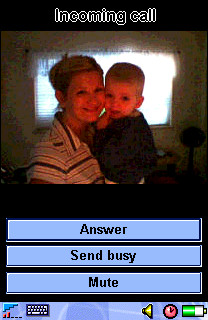 |
| Display images when address book entries call. |
Let's begin with brass tacks: talk. The P800 works very well as a phone, offering handheld, speakerphone, and wired/wireless headset options for chatting. SE promises 400 hours of standby and 13 hours of continuous talk. My P800 has delivered about 50% of those totals, excluding other forms of use, like taking photos. Maybe I've got a bum Li-polymer battery pack, but I'll bet my numbers are close to average when graded on a curve. You can use MIDI song files as ringtones, but surprisingly the P800 cannot use an MP3 file as a ringtone even though it has built-in playback capabilities (more on that later). The P800 maintains a contact list that is separate from any you may have on your SIM card, although import/export capabilities allow you to perform a "dumb synchronization" (really, just an overwrite) from your P800 to your SIM. Speed Dial shortcuts are provided for 1-9 on the keypad, and photos you take with the camera can be associated with contacts and will display when those contacts call in. This is a slick feature and it adds a very personal touch to your day-to-day conversations.
The speakerphone feature is well designed. It automatically engages if the keypad is flipped open while you're on a call; the handset assumes you could looking for something on the P800's display and therefore not holding the device next to your head. The included earbuds work fine as a headset, although I still don't understand why SE sees fit to use a proprietary jack; otherwise I could use any standard 1/4" headset to listen to MP3s or take calls. Must be a voltage thing. A Bluetooth-compatible headset, easily paired with the P800 by following the on-screen prompts, is a better all-around choice for hands-free talk.
For SMS and email, having the power of a handwriting/QWERTY keyboard input system really makes convergence devices shine in comparison to traditional keypads and workarounds like T9 text input. The P800 is no exception here, and it makes composing and replying to SMS a quick and efficient affair. You may use the stylus to directly enter alphanumeric characters onscreen using gestures that are wisely designed to mimic Palm's Graffiti 2; the main difference is that the screen divides letters from numbers horizontally vs. the Palm's traditional vertical split. The interpreter built into the P800 is called JotPro, and its function is quite similar to the Palm input experience. The stylus, itself, however, is a narrow, flimsy, and easy-to-misplace affair that snaps to the side of the P800. You'll want to use almost anything else instead of this afterthought. A popup virtual keyboard is always available and its keys are acceptably sized for tapping with a stylus, though not fingers. All P800 applications use either input system, so there's no learning curve beyond basic gestures and displaying the popup keyboard. What's missing? A system for storing gesture shortcuts for frequently-used words and phrases (like Palm provides). But otherwise it's an effective mix.
With email, the P800 supports multiple inboxes. The default messaging client allows POP or IMAP access and synchronizing your inbox only requires a valid GPRS data connection plan and some patience during the setup process. Sony Ericsson's own website offers to auto-configure your P800 with the right settings with OTA (over-the-air) instructions using an "MMS Configurator" utility, but this only seems to work for T-Mobile in the USA. Otherwise you'll spend a fair amount of time hunting down and entering GPRS connection info (much like configuring TCP/IP networking on a desktop PC) if your handset doesn't ship with the right presets. Once you're past this hassle, though, sending and receiving email on the P800 is a practical activity. True to my late-adopter traditions, I haven't used any of the available reader applications to view Microsoft Office attachments or PDF documents, but supposedly some good packages are available.
The P800 shines as a composition tool for MMS, because it's such a useful device for capturing original media, like audio and photos, wherever you are. The MMS editor allows you to assemble a slide show of text, images, or audio, which can be sent to other MMS-capable mobiles and email addresses alike. MMS remains a nascent messaging technology in the US, but putting more devices like the P800 into the marketplace can't hurt adoption rates.
Digital Camera
This is the first camera-equipped phone I've put to everyday use. It shoots 640x480 images with 24-bit color depth, which is more than acceptable for simply capturing whatever you witness as you go about your day. Unfortunately it can only display images with 12-bit (4096 colors) depth. It's by no means a digital camera replacement, but some wonks believe cameraphones will shoot print-ready photos and replace the most compact and "ordinary" digital cameras in a couple of years. I can certainly take some stock in this prediction after a few days shooting pics with the P800. It shoots landscapes and other still, well-lit images with highly agreeable clarity and color accuracy. It does modestly well with indoor and low-light situations, but it's really more than acceptable for "party" snaps and other informal, capture-the-moment images. To see just how well the P800 stacks up against its contemporaries in image capture quality, check out Steve's shootout. I also have a moblog I've been keeping since I got my P800 that holds a variety of pictures I've taken mainly while on the go.
Images are easy to select for messaging to others, either as MMS or ordinary email attachments. Nonetheless, I'd love to see someone develop a "bulk mailing" P800 application for moblogging, or possibly even auction item listing association. It's much too tedious to send a series of images as individual messages with attachments. With camera-enabled covergence devices, there's a real opportunity here for third party developers to create applications that enable previously impractical tasks involving imaging in the field. Break-fix repair technicians, claim adjusters, medical first-responders, and a host of anonymous enterprise applications are there for the building; it's up to developers and end users to recognize what mobile imaging devices like the P800 make possible and then find the most pressing problems to solve.
PDA Functions / General Applications
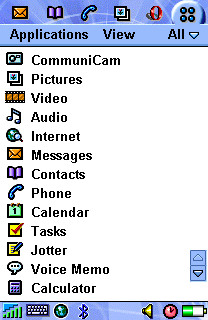 |
| The P800 ships with a typical array of PIM applications, but many more are available for download. |
If you're looking for deep wisdom and insight into the suitability of the P800 as a replacement for your current PDA, or as your first, sadly my experience may not help your with decisionmaking. I use the P800 first and foremost as a cameraphone and mobile messaging client; applications and contacts/calendar/tasks are a distant second priority for me, and my dirty little secret is that I'm not yet ready to let go of my Palm! The P800 does offer a surprisingly wide variety of third party applications to date because its Symbian OS supports applications written in both Java (J2ME) and C++. You can explore a sizeable library of titles at My-Symbian.com. Another option is AppForge. By installing their cross-platform Booster runtime environment, you may browse a live catalog of downloadable shareware titles. AppForge is similar to Verizon's GetItNow! pay-per-application program, powered by the Qualcomm Brew framework. It allows you to download applications wirelessly (rather than synchronize an installation through your PC) and pay for the ones you keep past a limited free trial period.
For media fun, the P800 is capable of playing back MPEG-4 video (but not recording it, unless you believe what you'll find here) and MP3 files kept in internal storage. I don't know that the video playback feature is terribly useful on today's North American networks, but it's nice to see the smart kids at Ericsson exercizing their head-of-the-class instincts with more mature 3G networks in mind (i.e., 3). To view streaming video on your P800, on-demand, would really be something; shoot, I'd even pay for access to some headline news and sports highlights. Again, I take issue with the proprietary headphone jack -- it's just a pointless specialization in an otherwise open standards-oriented package.
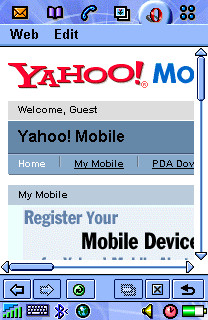
As a mobile browser, the default client is acceptable, but a much better replacement can be found in the free Opera download SE makes available directly from their P800 site. The 320x208 display area is of course too narrow to handle most desktop-oriented website content without excessive scrolling, but Opera's ability to compose a usable page is commendable -- even with framesets. Opera is able to browse either HTML or WML "wireless web" sites. One very useful Opera feature is called "Fit to page." It forces any site to scroll only vertically by compressing images and realigning all content within a single, display-width column. This feature can create an incredibly 'tall page, however, and it requires extra rendering time (over a minute to load CNN.com in this mode vs. about 50 seconds in the standard view). It would be nice if Opera could rotate the browser display 90° and display pages in a landscape layout; this way the P800's 308 pixel-wide aspect could be put to more effective use.
 |
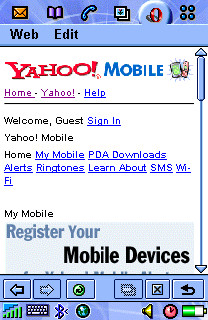 |
| Opera browser display without "Fit to page" feature applied. Lots of horizontal scrolling. | Opera with "Fit to page" applied. Unnecessary styles/graphics removed, others resized to fit 208 pixel display. |
Synchronizing or downloading data from the P800 proved to be a Jeckyll and Hyde affair. The P800 Phone Connection Link package auto-detected and transferred image files between the P800 and my Thinkpad effortlessly when using Infrared. With my external Belkin Bluetooth USB adapter, however, detection and pairing was completely hit-or-miss. Nearly every time I attempted to connect, the Bluetooth adapter would report a serial port conflict. When I would simply try again, the conflict would vanish without a trace. Sometimes. I'm willing to blame the aftermarket Bluetooth adapter for my troubles, up to a point, but I just shouldn't have to master IRQ settings and mind serial port conflicts in 2003. I thought these late-model synch technologies were supposed to make these headaches disappear? C'mon, driver developers. You know you can do better.
I think that the success of the P800 (and its Symbian-powered peers and successors) depends largely upon the continued adoption of Symbian as a general purpose pocket computing OS. As long as developers are incented to build applications for a growing user base, then the Symbian OS and the UIQ variants like the P800/900 should gain traction. I still need to see the new Treo 600 in action to decide whether I could give up the Palm PDA environment for good. At this stage, I carry the P800 and a Tungsten T2, so I guess the answer is currently, "nope."
Bottom line
The P800 is a brilliant camera/phone/MMS messaging device. At $539, which is AT&T's latest with-activation pricing, it's comparable to the cost of a higher-end PDA plus a basic cameraphone and service plan combined. If, like me, you're just getting your head around the idea of having one device from which to run your daily show and tell, the P800 merits real consideration unless you're a Palm or PocketPC loyalist. It's true that the just-announced P900 promises to advance nearly all of the P800s capabilities while slimming down the form factor, so if you're patient or still on the fence, you might sit tight.
Ratings
phone: 8
texting: 9
mms: 9
email: 9
browser: 5 (Opera: 8)
pda features: N/A
camera: 10
battery: 6
usability: 8
durability: 7
stability: 9
gameplay potential: 7
third party apps: 8
fashion: 6
out-of-box accessories: 7
October 20, 2003
review: nokia n-gage
i first realized that gaming would take off on phones when i got my first nokia 8290 and played my first game of "snake". actually, it was a day later when i walked into the bathroom at work and heard the sounds of "snake" eminating from one of the stalls. "hmm, maybe there is something to games on phones as a timekiller."
ever since nokia announced the n-gage a combination game machine and phone, i was extemely intrigued. after reading a few initial reviews and hearing comments from colleagues that had tried them, i had written off the n-gage as a failure that i'd take a pass on. silly me, i should have known better. while walking through the local mall on release day (unbeknownst to me) i saw the stack of n-gage boxes out of the corner of my eye in the local electronics boutique, and well, 5 minutes later i was a proud owner.
of course the shop clerk was more than willing to promote it, but he actually seemed genuinely excited about the n-gage, and had tried it the night before (each store manager was given a promotional handset. lucky dogs) with nothing but good things to say. this young man, who best resembled a cross between jack black and the "comic book guy" from the simpsons, said "this is perhaps the coolest thing i've seen all year. the screen is amazing, and the call clarity is way better than my old handset, and if i could get a bluetooth headset..." well you get the picture. whomever paid for the free handset helped at least one sale. the n-gage is sold in north america in both t-mobile and att wireless versions, with an inactive sim that you can either activate, or replace with your existing sim card. the device is SIM UNLOCKED. whew.
the n-gage has to be both a phone and a game console. so you need to set your expectations. currrently there is no phone on the market that's perfect, and no game console that's perfect, so even though nokia sure had the chance here to exceed at both, it's unrealistic to expect it. i'll tackle the phone characteristics first, and then present the gaming capabilities.
those who are familar with the nokia 3650 line of phones will immediately notice a lot of similarities to the n-gage, because they are both based on the symbian series 60 platform. they are slightly different versions however and not all programs compiled for the 3650 work on the n-gage.

the phone supports most of what you would expect it to - it has a speakerphone, a wired headset, and supports bluetooth headsets that support the "handsfree" bluetooth specification. as i have a bluetooth headset that supports the "headset" profile, it would not work with the n-gage. make sure you check this out before purchasing a bluetooth headset. i recommend the sony ericsson hbh-60 or it's soon to be released successor, the hbh-65.
the speakerphone works great, but i have to be honest, i could not for the life of me figure out how to use the n-gage as a phone you hold up to your ear...finally figuring out you have to hold it perpendicular to your head instead of flat against it! imagine cutting a compact disc in half, and then holding the edge you just cut flat against your cheek and you'll get the picture.
on the messaging side of things, the n-gage supports SMS, MMS and email (both POP3 and IMAP). looking at the UAProf, the phone supports MMS up to 100K, and images up to 640x480. also, it supports both symbian and j2me installers to be sent as an MMS, as well as 3gpp video - features that i haven't seen anyone taking advantage of yet - but seeing as this is a gaming phone, it could be a bettter way to deliver games to the phone instead of WAP download. the MMS player itself still doesn't support MMS slideshows, which i found a little surprising.
the email client itself only allows for one mailbox to be active at a time. the client is adequate for receiving and viewing mail, not the best for responding. that said, it's as good as you can find on a phone-phone without paying extra.

sizewise, the n-gage is big for a phone, but it was actually smaller than i expected from the pictures. it's not any worse than a p800 for carrying around in your pocket, and it is a bit thinner, which is the dimension that counts, to a certain extent.
battery life is not stellar. it will last a good day if your signal is strong, otherwise it seems to drain a little faster than i have come to expect from a nokia phone. there's also no indicators to tell you bluetooth is on, and when bluetooth is on, the battery drains even faster. battery life is a little below average, but passable.
enough with the phone, how about the games?
wait, before i get into games, you should note the n-gage also has a radio that requires the headset to be attached, and an mp3 player that can play mp3s off internal memory or the MMC card. the mp3 player seems to be handle high bit VBR recordings just fine, a problem i have had before with some other phones that can play mp3s. you do have to use an included adaptor to listen to music or play games to a standard pair of headphones.
there is also now an included screen shot utility, making it super easy to snap some of the examples you see here.
what about the games?
i'm glad you asked. first, i'm sure you've all read about how you have to switch games when using a cartridge. if not, i'll paraphrase. cartridge games are delivered on an MMC card, but in order to switch games, you have to turn off the machine, pop off the back, remove the battery, and swap the MMC card out. yes, you have to remove the battery. this seems to have been a remnant of engineering in which removing the SIM card with the battery in can short the phone - yet hot swapping MMC cards doesn't seem to be a problem for the likes of palm, and having gaming cartridges go into an exernal slot in a portable gaming machine was done in the early nineties on the SEGA game gear, but that's not the biggest problem i have. the biggest problem is that they didn't include 2 MMC slots.
with only 1 slot, you can *either* play a game or use an app you have saved to the MMC card, but not both. it would have been nice to have a 128MB MMC card for apps and mp3s, and then another slot for cartridge games. that would have gone a long way toward making this an all in one device. even better would be a way to do a transfer of a cartridge game to your own MMC so you could consolidate games onto one MMC, but the digital rights around that would be a nightmare. having to swap MMC cards is okay, but not an optimal solution.
thankfully, playing games is a lot of fun on the n-gage. games you used to play on your other phones will just be easier on the n-gage, mostly due to the physical phone profile of it looking and feeling like a game controller. for instance JAMDAT football, which i found clumsy to operate on the LG VX6000 and the nokia 3650, is way more fun to play on the n-gage. i was also able to copy some j2me games written for some other phones to the n-gage such as cybiko tetris, and they all worked much better (and loaded way faster!) on the game deck. there are a lot of third party games and apps you can get for the n-gage. a good place to start is my-symbian.com.
i tried 2 cartridge games: Lara Croft Tomb Raider and Sonic N.
tomb raider looks about as good as any game i've seen on a screen this size, pretty comparable to the 3d demos on the p800. it has an online mode (n-gage arena) for racing other online opponents over gprs. it's not taxing on the network but a good example of what can be done over gprs.

sonic is fun, with plenty of depth, and saves your game as you progress automatically which is cool. the graphics are pretty good, although i have to say this game looks better on a palm tungsten c. playability, however, is won by the n-gage. there's a lot to say for playing games with a game controller vs some odd layout of buttons.
the console has the ability to play networked games of up to 6 people over bluetooth, which is great, but since i doubt i will know 6 people with an n-gage, only the future will tell if this will be a useful feature. it has nintendo backpedaling a bit, who recently made a deal with motorola to supply a wireless gaming interface to the gameboy advance.
the real power will be whether or not programmers can pull off networked games over GPRS. it's possible. when i was a younger lad, i played many a game of ID's Quake with capture the flag mod over a 28.8 modem which was adequate until some LPB (low ping bastard) came in on his (or her, but let's be realistic, it was probably a him) t1 and started shooting up the place. with a somewhat level playing field, i await someone to port quake to the n-gage so we can all try this out. better yet, if they EA can get networked FIFA to work over GPRS, they might just sell three more n-gages in this office alone.
summary
i like the n-gage. it's a phone you can play games very well on. it's not a game console that will go up against nintendo game boy advance. it's in a whole different price class. it is in a category of its own! i commend nokia for trying to innovate, and test the waters for how all these mediums can play together. it's not the best phone on the market, it's not the best game console on the market. it is, however, the best phone on which you can play games on the market. who will nokia sell the n-gage to? good question. i'd love to get my hands on the owner demographics once we make it through the holiday season.
ratings
phone: 7
texting: 8
mms: 7
email: 7
browser: 7
pda features: 6
camera: 0
battery: 4
usability: 7
durability: 8
stability: 9
gameplay potential: 10
third party apps: 9
fashion: 8
out-of-box accessories: 7
September 05, 2003
review: lg vx6000
last month, verizon claimed their subscribers sent one million picture messages in the first month of service. as part of that launch, they introduced their flagship camera phone, the LG vx6000 -
made by korean manufacturer lg.
In this launch, verizon is selling much more than the device, but rather a packaging of data services that are supported by the phone, under the moniker get it NOW, there are services such as getPIX (picture messaging), getGames and getGOING (BREW apps), getBROWSING (WAP browser), and getALERTS (text message msn alerts). the vx6000 supports all these services and more, including verizon's CDMA 1XRTT 2.5G "express network". to some extent, i'll be commenting on the total package, and not just the device, because they are pretty intertwined.
the vx6000 is a clamshell phone, very similar to earlier models vx4400, as well as fellow korean manufacturer samsung models like the V205. it has a built in camera on the "top of the clam" as well as a color status screen, which with the tap of a button will give you the time, battery level, signal strength, 1x reception, and message status. included next to the camera lens is a mirror, used for taking those "here i am look at me" shots - when your face shows up in the mirror - you are in the frame. strike a pose and snap. the screen on roof of the clam's mouth is about as bright as you are going to find, although the resolution is nothing to write home about. it has a dedicated camera button, two softkeys, and a joypad with a center selection button. it uses the clear ( CLR) key as the back button, a feature i'll never get used to.
 |  |
| the LG VX6000 compared to Samsung V205, and SE T610 | |
the phone itself is pretty average, it's a phone. verizon's voice network is great and the coverage so far is about the best i've seen. the contact list allows for multiple email and phone numbers, which is key when it comes to emailing pictures. i find i tend to fully utilize a contact list such as this on CDMA phones, and not so much on GSM phones (since the SIM holds the lowest common denominator info) so i'm glad to see that here. absent is a speakerphone, which seems like an easy addition these days given the sensititivy of microphones, and the loudness of the earpiece anyway.
the camera itself is probably one of the best on the market today (that can be found on a phone, in north america). although it only shoots at 330K pixels (VGA), it comes with a zoom in and out, contrast, lighting, and some fun frames, where you can put a picture of your head on the body of a hulking body, for example. after snapping the picture, you can send immediately to another verizon subscriber at their number, email it to any email address, or save to the supplied photo album at vzwpix.com. although not a full blown moblog, you can send and receive pics from the website and share them via albums. you can add text and voice to your pictures - but beware, this is not true MMS. the audio format is the qualcomm "qcelp" (can you at least create an acronym we can pronounce?) and the pictures aren't framed in SMIL documents when send from the phone. i was able to send cross-carrier to MMS capable phones on GSM networks by setting up the Now SMS MMS gateway, but because of the lack of standards conformance, pictures came in as attachments, and the audio files could not be converted to WAV or AMR as is the MMS standard.
to test the quality, i took some pictures using some other best of breed cameras on phones, the sony ericsson p800, and the nokia 3650 so i could see the comparison. all 3 pics were taken with my feet in the same place, with same center of focus attempted. i think my eyes saw the colors of the p800 photo, and the details of the VX6000. i think some of the indoor photos showed up even better than this one. note that no camera phone on the market today is a replacement for a standalone digital camera - they are good for taking pictures about the size you see here, but not good enough for printing 5x7s at shutterfly or ofoto.
 |  |  |
| LG VX6000 | Sony Ericsson P800 | Nokia 3650 |
nevertheless, this service makes picture messaging E-Z, which is what has to happen to make this launch a success. eventually, they'll need to figure out how to make it as easy to send to non-verizon subs - a topic of another entry.
the vx6000's thin-client platform of choice is BREW which promises and in my opinion delivers here a compelling model for data interaction over using the wap browser. with one touch you can go to the "get it NOW" screen which allows you to run or browse the catalog of brew applications, which can be downloaded (for both purchase or trial) over the air to the phone, and then run. most of the apps are between $3-5 and some are subscription based. most of the productivity apps are excellent, such as soda-pop email client, vindigo, and accuweather - enough so that you'll never want to use a WAP browser again. all 3 of these apps get right to the task, communicating with the network as needed, with totally acceptable speed. enter a zip code into the accuweather app and 2 seconds later you can browse forecasts, sattelite and radar maps. the same task on a WAP browser would probably take a couple minutes, if you succeeded at all. interestingly - BREW apps use the 1X data connection, the WAP browser does not, it just uses circuit switched data. the 1X data for BREW is snappy - definitely a little more so than GPRS, mostly because of the reduced connection time. picture messaging also uses the 1X connection.
BREW also doubles as the gaming platform for the vx6000 - and here i wasn't especially impressed. the FIFA soccer game ended up being nothing more than penalty kicks, which is lame compared to marcel desailly soccer that is a full field match on the likes of the nokia 3650. a few of the games are good time passers, but i just wasn't blown away by anything. perhaps the content is just not there yet.
the obvious value that becomes apparent with BREW is that it's a total solution for operators to deploy - the vending machine is built into the infrastructure so operators don't have to roll their own solution, and you don't have to navigate through WAP to get to the what might be better content, a la mMode. it's super simple to try and purchase apps, which is an important part of the equation. it's also good that there is a "check for upgrade" feature built in. of course, the control brings a lack of openness, and it's unclear how you could get your ownn apps into this environment.
back to the phone. the lack of out of the box accessories is a bit of a bother. the only provided charger is a desktop cradle and a wall brick charger, niether of which you could comfortably take on a business trip. i'd love to see more out of the box USB chargers. there's also no provided headset, so you'd have to go purchase one of those as well. it does come with a belt clip however, if you are so inclined. i didn't test the 1X data connection to my laptop, as these cables are not included, and there is no infrared or bluetooth.
the battery life seems a little better than the similar samsung phone. after the inital charge, with investigative use, i only had to charge it after 3 days, which is above average for the features the phone has. this probably has something to do with verizon's strong signal - as the phone can operate at much lower power.
all in all, if you like the clamshell and a great voice and data network while on the north american continent - this is a great camera phone - perfect for moblogging, talking, and accessing remote data via 1X. the get it NOW BREW apps are great examples of how to get at mobile data from a phone profile, provided there is an app that does what you need. in addition, verizon's web services packaged around the phone provide a good direction for other operators on how to sell the total solution, not just a phone.
ratings
phone: 7
texting: 5
mms: 3
email: 6 (with optional brew client $2.99)
browser: 5
pda features: 5
camera: 9
battery: 8
usability: 7
durability: 8
stability: 9
gameplay potential: 7
third party apps: 8
fashion: 8
out-of-box accessories: 4
August 18, 2003
review: rim blackberry 7230
a few years ago i was in waterloo, ontario in a meeting with the blackberry product manager. one of the bonehead "salesguys" i was with piped in and said "you know, you really need to make your devices look cooler. the graphics look terrible compared to a palm or pocket pc, and you have to have color". i remember thinking " i'd trade it all as long as i can keep my week long battery life! email and battery life." today i hold in my hand the blackberry 7230, the first color model to appear in the US. the graphics do look cool, and well, so far the battery is holding up. let's face it, monochrome screens are a thing of the past. in a year owning a monochrome phone will be a bit like owning a black and white tv, especially in the PDA world.
the blackberry (aka the "crackberry") is perhaps the most addictive piece of gadgetry out there, to the extent that the CEO of RIM and his wife have to lock their devices in a safe over dinner so that they do not respond to incoming emails. for receiving and responding to emails on the go, there is no equal. i've been a "user" since the first iterations, and have owned the mobitex, ineternet, enterprise, GPRS, and even the AOL versions at one point or another in my career. i must admit lately i've been getting by with email retreived via GPRS on various smartphones, and have relished not being tied to this device, but with the release of the 7230, it was definitely time for a relapse.
the form factor of the 7230 is a little smaller on the length and width than previous generations, but a little thicker in the depth depth, probably to accomodate the on board phone. the custom roller-escape button combination is still there and rim has added a quick access phone button on the top. the phone is now tri-band 900/1800/1900 so you no longer have to leave your RIM at home when you go transcontinental (although with GPRS, you have to leave it at home if you go to rural america).
side by side:

|
thickness:

|
browsing to cnn:

|
rim doesn't claim to market the 7230 and its ilk as a replacement phone, but it's there if you need it - which is probably a good move given the device's profile. that said i think there will be times where this is the only device i carry, with my primary number forwarded to the rim. despite what i've seen in some other articles about the 7230, the rim phone does not require the use of an earbud, you can put the device right up to your cheek and use it like a phone, which doesn't look as awkward as one might think. one cool feature the phone has is "smart dialing" which gives you the ability to put extensions in your phone book, and insert necessary pauses. if this exists on other phones, i haven't seen it - but then again, i never read phone manuals. i expect them to just be naturally usable. c'mon, it's just a phone, right?
using the embedded browser/gateway combo provided by t-mobile, wap sites are fast and easy to read (they still put the same old t-zones wap stack on this device) and most HTML sites are transcoded in a way that makes them usable and readable, just by using the scroll wheel.
as far as mobile email, RIM has gotten rid of the "internet" and "enterprise" versions, bundling capabilities of both onto one device. you can setup up to 10 external email accounts to be polled and pushed onto the device every 15 minutes or forward your mail directly to the device. you get an email address for the device ( userid@tmo.blackberry.net ) but you can set the "From" address to anything you want using the blackberry.net website, so no one ever knows you are using your blackberry. i personally use procmail on unix to forward my mail to my RIM so i receive mail immediately, but your IT department may or maynot be willing to do this.
you can now view .doc, .ppt, .xls, and .pdf files out of the box, which in itself is a huge improvement over the older versions i owned. i was especially impressed by the PDF viewer, but disappointed there are no image viewers. after all, i have a color screen now! in general, GPRS mail delivery seems a lot faster than on previous versions (but then again, tmobile's GPRS just seems a lot faster in general lately).
Also included is a "BrickBreaker" game which is a breakout clone that shows off the color and works pretty well with the scroll bar.
the SMS version of aol instant messenger worked great on this device, and of course texting is extremely easy. unfortunately, there is no MMS client so the picture messages i get (i'm getting more and more these days) will just go into the bit bucket. please, someone write an MMS client for this device. pretty please.
the biggest problem for rim is still the lack of third party applications that will help them breakout of the corporate marketplace. even after making the device able to run J2ME apps, we have not seen the plethora of commercial apps that have sprung up for say, symbian devices (i'd say palm, but palm had a huge head start). it will be interesting to see what happens once palm and nokia integrate the blackberry email capability into their devices. if it works well enough, will anyone purchase one of these? i don't know how many time's i've heard "if only i could get blackberry email on my palm". i'm sure RIM is well aware of this, as they don't sell that many devices. it's probably the software that gets them the real margins. actually, i don't think palm has announced integrating the email capability, just the keyboard, but we'll see what they do.
i did receive a few java stack trace exceptions while using the browser (most of you call these bugs) but the device didn't crash and second tries usually got past these.
so if you are already a blackberry addict - i do recommend the 3230 as an upgrade, and if you ever wanted a blackberry, this is a good place to start. the color screen does make the device more enjoyable to use, believe it or not, although with the supplied apps, it practically won't make that much of a difference. battery life with color doesn't seem to be an issue, and it's even less of an issue since it now comes with a USB charger out of the box. if you are already travelling with a laptop, all you need to carry is one lightweight cable. of course, hopefully there will be a few trips where i can only carry this device, and leave my laptop at home.
if you occasionally need a phone, but rely heavily on your email and texting, this might be the best device for you.
cost
t-mobile us sells for $399 USD. unlimited email service is $39.99/month.
ratings
phone: 7
texting: 10
mms: 0
email: 9 (missing image viewers)
browser: 7
camera: 0
battery: 7
usability: 7
durability: 5
stability: 5
gameplay potential: 6
third party apps: 4
fashion: 6
out-of-box accessories: 10
legend:
0 = nonexistent
3 = below average
5 = average
7= above average
10 = the best i've seen